What Is CSP: The Header That Decides Which Scripts Run
What is CSP, what each directive does, and how we run a nonce policy next to 'unsafe-inline' on the same Next.js site.

Key Takeaway
CSP is an HTTP response header that lists where scripts, styles, images and connections may come from, and the browser refuses everything else. Start with Content-Security-Policy-Report-Only, read the violations for a week, then enforce. The part that matters most is script-src without 'unsafe-inline', which in practice means nonces.
Here is the Content-Security-Policy this site sends on its static pages right now, trimmed for width:
Content-Security-Policy: default-src 'self';
  script-src 'self' 'unsafe-inline' https://js.stripe.com https://cloud.umami.is ...;
  style-src 'self' 'unsafe-inline';
  frame-ancestors 'none'; object-src 'none'; base-uri 'self'; form-action 'self'
That 'unsafe-inline' in script-src is the thing every CSP guide, including this one, tells you to remove. It is still there on our marketing pages, and further down I explain why, and why the pages that handle scan results and payments run a different policy with no 'unsafe-inline' at all.
What is CSP?
CSP (Content Security Policy) is an HTTP response header, Content-Security-Policy, that tells the browser which sources a page may load scripts, styles, images, fonts, frames and network connections from. Anything not on the list is blocked before it runs. Its main job is to turn a cross-site scripting bug into a blocked request instead of a stolen session. The current spec is CSP Level 3 at the W3C, and MDN's reference tracks browser support per directive.
A quick way to see it working: inject <script src="https://evil.example/x.js"> into a page with script-src 'self' and open the console. Chrome prints something close to Refused to load the script 'https://evil.example/x.js' because it violates the following Content Security Policy directive: "script-src 'self'". The HTML injection still happened. The script never executed.
So CSP doesn't fix the bug that let an attacker write HTML into your page. It limits what that HTML can do once it's there.
The directives you actually set
A policy is a list of directives separated by semicolons. Each directive names a resource type and the sources allowed for it. Most of the spec you can ignore. Real-world policies are nearly always some subset of this table:
| Directive | Controls | Sensible start |
|---|---|---|
default-src | Fallback for every fetch directive you don't set | 'self' |
script-src | JavaScript: files, inline blocks, event handlers, eval | 'self' plus a nonce (see below) |
style-src | CSS files and inline styles | 'self' 'unsafe-inline' (inline styles are far less dangerous than inline scripts) |
img-src | Images | 'self' data: https: |
connect-src | fetch, XHR, WebSocket, EventSource | 'self' + your API and analytics hosts |
frame-ancestors | Who may embed your page in a frame | 'none' (the modern X-Frame-Options) |
object-src | <object> and <embed> plugins | 'none' |
base-uri | What <base href> may point to | 'self' |
form-action | Where forms may submit | 'self' |
Two of these catch people out. frame-ancestors and form-action do not fall back to default-src, so leaving them out means no restriction at all. And frame-ancestors is ignored when the policy is delivered through a <meta http-equiv> tag rather than a real header, along with report-uri and sandbox.
Why 'unsafe-inline' undoes most of it
Most XSS payloads are inline: <img src=x onerror=...> or a <script> block with no src. 'unsafe-inline' in script-src allows exactly those, so a policy that contains it mainly protects you from attackers who are polite enough to host their payload on a separate domain.
There are two ways out.
Nonces. The server generates a random value per response, puts 'nonce-<value>' in script-src, and adds nonce="<value>" to every script tag it renders itself. Injected HTML can't guess the value, so it doesn't run. Pair the nonce with 'strict-dynamic' and scripts loaded by a trusted script are trusted too, which is what makes Stripe.js or an analytics loader work without listing every host they pull from. Google's strict CSP guide is the clearest write-up of this pattern.
Hashes. For a static page with a fixed inline script, put 'sha256-<base64 hash>' of the script body in the policy instead. No server-side randomness needed, but the hash breaks the moment someone edits the script.
One detail that makes migration safe: when a browser that supports CSP Level 2 or newer sees a nonce or hash in script-src, it ignores 'unsafe-inline' in the same directive. You can ship 'unsafe-inline' 'nonce-...' together. Old browsers fall back to the inline allowance, current ones enforce the nonce.
What we actually run, and why it's split
This site is Next.js on Vercel. A nonce has to be generated per request, and a page that is prerendered at build time has no request, so it can't carry one. Our options were to render every marketing page dynamically (slower, and no static caching) or accept 'unsafe-inline' where the risk is lowest.
We split it. Prerendered pages - articles like this one, the tool pages, the homepage - get the static policy shown at the top. Routes that carry tokens, payment or scan data (/results, /subscription, /admin and a couple more) are rendered per request, and a small proxy.ts gives each response a fresh nonce:
script-src 'self' 'nonce-<per-request>' 'strict-dynamic' https://js.stripe.com ...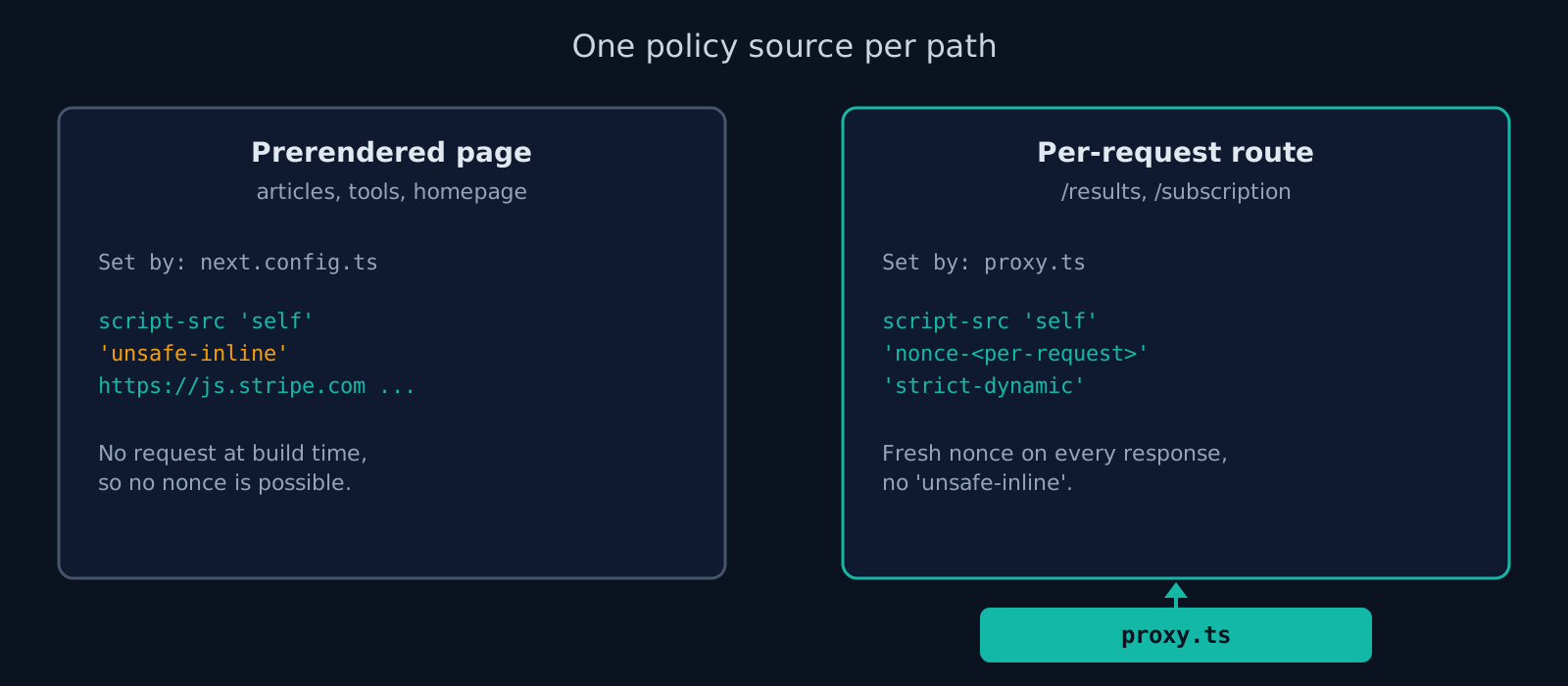
Violations on those routes are posted to a report endpoint, so a regression shows up in the function log instead of only as a blank page. The trade-off is deliberate and it is not where we want to end up: an XSS bug in a static article would still be exploitable inline. But the article pages render no user input, and the pages that do render user input are the ones with the strict policy. (Internal data from ismycodesafe.com, src/lib/csp.ts, checked 2026-10-04.)
Roll it out without breaking the site
A CSP that blocks your own analytics, fonts or payment widget is a self-inflicted outage. The safe order:
- Send the policy as
Content-Security-Policy-Report-Only(MDN). Nothing is blocked. Violations are reported. - Add a
report-togroup (or the olderreport-uri) pointing at an endpoint you can read, and leave it for a week of normal traffic. Weekly jobs and rarely used pages are where the surprises live. - Fix each real violation by adding the source or, better, removing the inline code.
- Switch the header name to
Content-Security-Policy. Keep reporting on.
You can run both headers at once: enforce a looser policy and report-only a stricter one you're working towards.
When we scanned 100 Y Combinator startups for our 2026 security header audit, 91% sent no Content-Security-Policy at all. Only 8 of the 91 reachable sites had one. Report-Only is the reason that number doesn't have to be yours: you can deploy it today without risking anything.
Copy-paste configs
Start from this policy and adjust the hosts. If you'd rather click than type, the CSP generator builds the same header from presets.
Nginx
add_header Content-Security-Policy-Report-Only "default-src 'self'; script-src 'self'; style-src 'self' 'unsafe-inline'; img-src 'self' data: https:; object-src 'none'; base-uri 'self'; form-action 'self'; frame-ancestors 'none'" always;Apache (.htaccess or vhost)
Header always set Content-Security-Policy-Report-Only "default-src 'self'; script-src 'self'; style-src 'self' 'unsafe-inline'; img-src 'self' data: https:; object-src 'none'; base-uri 'self'; form-action 'self'; frame-ancestors 'none'"Vercel (vercel.json), static policy, no nonce
{
  "headers": [
    {
      "source": "/(.*)",
      "headers": [
        {
          "key": "Content-Security-Policy-Report-Only",
          "value": "default-src 'self'; script-src 'self'; object-src 'none'; base-uri 'self'; frame-ancestors 'none'"
        }
      ]
    }
  ]
}
Next.js with a nonce (App Router; the file is proxy.ts in Next.js 16, middleware.ts before that)
import { NextResponse, type NextRequest } from "next/server";

export function proxy(request: NextRequest) {
  const nonce = Buffer.from(crypto.randomUUID()).toString("base64");
  const csp = `default-src 'self'; script-src 'self' 'nonce-${nonce}' 'strict-dynamic'; object-src 'none'; base-uri 'self'; frame-ancestors 'none'`;

  const requestHeaders = new Headers(request.headers);
  requestHeaders.set("Content-Security-Policy", csp); // Next reads the nonce from here

  const response = NextResponse.next({ request: { headers: requestHeaders } });
  response.headers.set("Content-Security-Policy", csp);
  return response;
}
Next.js stamps the nonce on its own inline scripts when it finds it in the request header, and every route the proxy matches becomes dynamically rendered. Scope the matcher to the routes that need it. The Next.js CSP guide covers the matcher and the next/script details.
What usually breaks first
- Google Fonts. Needs
fonts.googleapis.cominstyle-srcandfonts.gstatic.cominfont-src. - Analytics and tag managers. They load from one host and send data to another, so they need both
script-srcandconnect-src. Tag managers that inject arbitrary scripts are hard to fit into any strict policy. - Payment widgets. Stripe needs
js.stripe.cominscript-srcandframe-src, and its API host inconnect-src. Our own list is in the header at the top of this page. - Inline
onclickhandlers in older templates. Nonces don't cover attribute handlers. They have to move into a script file.
Check what you shipped
What's in your config file and what reaches the browser aren't always the same thing. A CDN, a framework default or a second headers() block can override it. Run the live URL through the header checker to see the CSP that actually reaches the browser, next to the rest of the security header set. For the bug class CSP is mainly there to contain, see cross-site scripting.
Frequently Asked Questions
- Does CSP mean anything else?
- Yes. In Windows cryptography it's a Cryptographic Service Provider, and Microsoft also uses CSP for its Cloud Solution Provider licensing program. In web development, and on this page, it's Content Security Policy: the browser header.
- Is CSP the same as CORS?
- No. CORS decides whether another origin may read responses from your server. CSP decides what your page may load and run. They are configured separately and solve different problems.
- Can I set CSP in a meta tag?
- Yes, with <meta http-equiv="Content-Security-Policy" content="...">, but frame-ancestors, report-uri and sandbox are ignored there, and the policy only applies to content after the tag. Use a response header when you can.
- Does CSP stop all XSS?
- No. A strict nonce-based policy blocks most script injection, but DOM-based bugs that misuse your own trusted scripts can still get through, and 'unsafe-inline' removes most of the protection. Treat CSP as the second layer after output encoding.
- Why doesn't my CSP block anything?
- The usual causes: the header is still named Content-Security-Policy-Report-Only, script-src contains 'unsafe-inline' without a nonce, or the policy is set on your API responses but not on the HTML document. A <meta> policy also only covers content that comes after the tag.
Check your website right now
200+ security checks in 60 seconds. Free, no signup required.
Scan My Website (Free)Claude AI helped me with phrasing and proofreading in this article.
ismycodesafe.com Security Team
We run automated security scans on thousands of websites daily, combining static analysis, SSL/TLS inspection, header auditing, and CVE lookups. Our team tracks OWASP, NIST, and evolving compliance requirements (GDPR, NIS2, PCI DSS) to keep these guides accurate and practical.
Related Articles
X-Frame-Options & HTTP Security Headers
The full seven-header set with copy-paste configs for Nginx, Apache and Vercel.
strict-origin-when-cross-origin Is Not Your Error
What the default Referrer-Policy sends, and where the real CORS error usually is.
Cross-Site Scripting (XSS): How Attackers Steal User Data
How XSS works, the three attack types, and why CSP is your strongest defense.
94% of YC startups ship with missing security headers (2026 audit)
Original research: we scanned 100 Y Combinator companies. Full per-header breakdown and raw CSV.