X-Frame-Options: DENY vs SAMEORIGIN Explained (Plus 6 Other Headers to Set)
One header blocks clickjacking. Seven headers block most browser-based attacks. Here is what each one does, how to configure it, and copy-paste examples for Nginx, Apache, and Vercel.
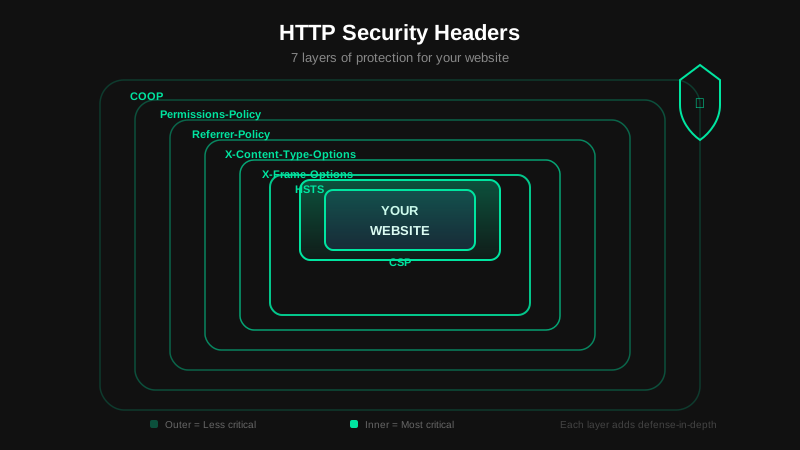
Key Takeaway
Set X-Frame-Options: DENY by default. It stops clickjacking with one line of server config. Add CSP, HSTS, X-Content-Type-Options, Referrer-Policy, Permissions-Policy, and Cross-Origin-Opener-Policy and you cover the seven most common header-based attack vectors. No code changes required. About 15 minutes to configure.
What Are Security Headers?
Security headers are HTTP response headers that tell the browser how to behave when loading your page. They are not application code. You set them in Nginx, Apache, Vercel, Cloudflare, or your framework's middleware, and the browser enforces them automatically.
Without them, browsers fall back to permissive defaults: any site can frame your page, scripts can run from any origin, MIME types get guessed, and referrer data leaks to every third party you link to. The first thing a security audit checks is which headers are missing.
How common is the problem? We scanned 100 YC startups in April 2026 and found that 94% were missing two or more of these headers, and 91% shipped without any Content-Security-Policy. The full YC audit has the per-header breakdown and raw data. For the broader security picture, see the Complete Guide to Web Security.
Two of these headers have their own full guides:
- What is CSP? Directives, nonces, Report-Only rollout and Next.js setup.
- strict-origin-when-cross-origin: what the default Referrer-Policy sends, and why it isn't your CORS error.
X-Frame-Options
X-Frame-Options controls whether your page can be loaded inside a <frame>, <iframe>, or <object>. That sounds niche. It is not.
Without this header, any website can embed your page in an invisible iframe, position it over a button on their own page, and trick users into clicking it. The user thinks they are clicking a "Win a prize" button. They are actually clicking the "Confirm transfer" button on your banking app. That attack is called clickjacking. It has been used to drain accounts, change email addresses, and authorize OAuth apps without the user noticing.
The fix is a single response header:
X-Frame-Options: DENYDENY blocks all framing from any origin, including your own domain. Use this on login pages, account settings, payment flows, and any page where a user takes an action that matters. Most pages should use DENY.
SAMEORIGIN allows framing from the same origin only. Use this when your own app embeds pages in iframes, like a dashboard loading reports or a CMS previewing content in a frame. Third-party origins are still blocked.
X-Frame-Options: SAMEORIGINThere is a third value: ALLOW-FROM uri. It lets one specific domain embed your page. Chrome, Firefox, and Edge all dropped support for it. It never worked consistently. Do not use it.
X-Frame-Options vs. CSP frame-ancestors
CSP's frame-ancestors directive does the same job and is more flexible. You can allow multiple origins, use wildcards, and combine the rule with your other CSP directives. Modern browsers support it. IE11 does not.
Set both headers. X-Frame-Options covers legacy browsers. CSP frame-ancestors 'none' covers everything else and gives you per-origin control when you need it.
# Both, for full coverage:
X-Frame-Options: DENY
Content-Security-Policy: frame-ancestors 'none'
If you are only targeting modern browsers and already have a CSP, you can drop X-Frame-Options. If you have no CSP yet, X-Frame-Options is the faster fix.
Spec: MDN: X-Frame-Options.
Content-Security-Policy (CSP)
CSP is the most powerful security header. It defines a whitelist of sources the browser is allowed to load resources from. If an attacker injects a <script> tag pointing to their server, CSP blocks it because that origin is not in the policy.
A starter CSP that blocks most XSS attacks:
Content-Security-Policy:
  default-src 'self';
  script-src 'self';
  style-src 'self' 'unsafe-inline';
  img-src 'self' data: https:;
  font-src 'self';
  object-src 'none';
  base-uri 'self';
  frame-ancestors 'none';
  form-action 'self'
Avoid 'unsafe-inline' for script-src. Use nonces ('nonce-abc123') instead. Set object-src 'none' to block plugin-based attacks. Use Content-Security-Policy-Report-Only with a report-uri to get violation reports in production before enforcing the policy. Full reference: MDN: CSP.
The full walkthrough, including how we split nonce and static policies on this site, is in What Is CSP.
Strict-Transport-Security (HSTS)
HSTS tells the browser to never load your site over HTTP. After the browser sees this header once, it automatically upgrades every request to HTTPS, with no server-side redirect needed for subsequent visits.
Strict-Transport-Security: max-age=63072000; includeSubDomains; preloadStart with a short max-age (300 seconds) during testing. Once confirmed, set it to two years (63072000). Add preload and submit to hstspreload.org so browsers enforce HTTPS even on the very first visit, before seeing any header at all. Defined in RFC 6797.
X-Content-Type-Options
Browsers sometimes guess the MIME type of a response by looking at its content, a behavior called MIME sniffing. An attacker can upload a file with a .jpg extension containing JavaScript. Without this header, the browser might execute it.
X-Content-Type-Options: nosniffOne value, one line, one attack class blocked. Always set it. See MDN: X-Content-Type-Options.
Referrer-Policy
By default, browsers send the full URL in the Referer header when a user navigates to another page. If your URLs contain tokens, session IDs, or any personally identifiable data, those values leak to every external service you link to.
Referrer-Policy: strict-origin-when-cross-originThis sends origin-only for cross-origin requests and the full URL for same-origin. For maximum privacy, use no-referrer. Reference: MDN: Referrer-Policy.
If you landed here because DevTools showed this value next to a failed request, read strict-origin-when-cross-origin is not your error.
Permissions-Policy
Permissions-Policy controls which browser features your page can access: camera, microphone, geolocation, payment, and more. If your site does not use a feature, disable it. Even if malicious code runs on your page, it cannot access hardware you have locked down.
Permissions-Policy: camera=(), microphone=(), geolocation=(), payment=(), usb=()Empty parentheses mean “disabled for all origins.” You can allow specific origins when needed: camera=(self "https://meet.example.com"). Full list: MDN: Permissions-Policy.
Cross-Origin-Opener-Policy (COOP)
When your page opens a popup, or another site opens your page via window.open(), the opener keeps a reference to the opened window. An attacker can exploit that reference to redirect the opener to a phishing page. The cross origin opener policy header severs that connection.
Cross-Origin-Opener-Policy: same-originsame-origin isolates your browsing context. Windows opened from your page cannot navigate back to it, and your page cannot be manipulated from a popup it opened on a different origin. This header is also required for cross-origin isolation, which enables features like SharedArrayBuffer. See MDN: COOP.
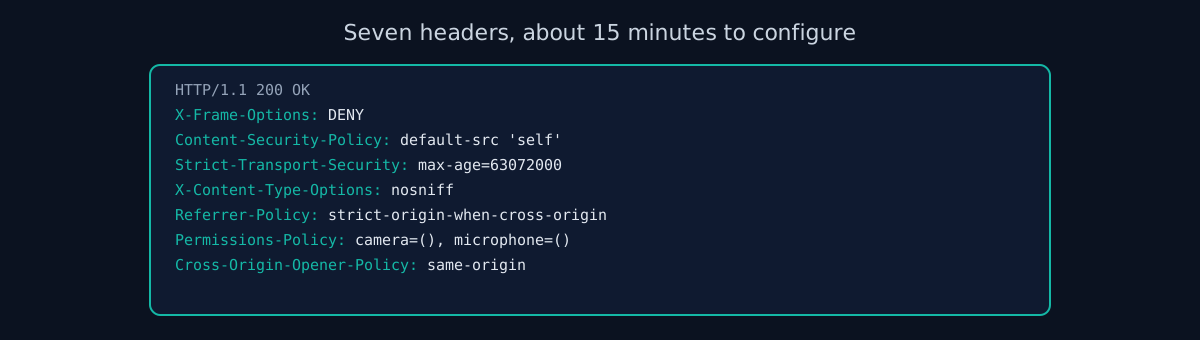
Full Example Configurations
Copy-paste configurations for common setups:
Nginx
add_header X-Frame-Options "DENY" always;
add_header Content-Security-Policy "default-src 'self'; script-src 'self'; object-src 'none'; frame-ancestors 'none'" always;
add_header Strict-Transport-Security "max-age=63072000; includeSubDomains; preload" always;
add_header X-Content-Type-Options "nosniff" always;
add_header Referrer-Policy "strict-origin-when-cross-origin" always;
add_header Permissions-Policy "camera=(), microphone=(), geolocation=()" always;
add_header Cross-Origin-Opener-Policy "same-origin" always;
Apache (.htaccess)
Header always set X-Frame-Options "DENY"
Header always set Content-Security-Policy "default-src 'self'; script-src 'self'; object-src 'none'; frame-ancestors 'none'"
Header always set Strict-Transport-Security "max-age=63072000; includeSubDomains; preload"
Header always set X-Content-Type-Options "nosniff"
Header always set Referrer-Policy "strict-origin-when-cross-origin"
Header always set Permissions-Policy "camera=(), microphone=(), geolocation=()"
Header always set Cross-Origin-Opener-Policy "same-origin"
Vercel (vercel.json)
{
  "headers": [
    {
      "source": "/(.*)",
      "headers": [
        { "key": "X-Frame-Options", "value": "DENY" },
        { "key": "Content-Security-Policy", "value": "default-src 'self'; script-src 'self'; object-src 'none'; frame-ancestors 'none'" },
        { "key": "X-Content-Type-Options", "value": "nosniff" },
        { "key": "Referrer-Policy", "value": "strict-origin-when-cross-origin" },
        { "key": "Permissions-Policy", "value": "camera=(), microphone=(), geolocation=()" },
        { "key": "Strict-Transport-Security", "value": "max-age=63072000; includeSubDomains; preload" },
        { "key": "Cross-Origin-Opener-Policy", "value": "same-origin" }
      ]
    }
  ]
}
Test Your Headers
Our scanner checks all seven headers and flags missing or misconfigured ones with specific fix instructions. Takes 60 seconds. To check just the headers on one URL, use the header checker.
Frequently Asked Questions
- What does X-Frame-Options do?
- X-Frame-Options controls whether your page can be embedded in a frame, iframe, or object element on another site. Setting it to DENY blocks all framing and prevents clickjacking attacks, where an attacker overlays your page invisibly to trick users into clicking hidden buttons.
- Should I use DENY or SAMEORIGIN for X-Frame-Options?
- Use DENY unless your own application embeds the page in an iframe. DENY blocks framing from all origins, including your own domain. SAMEORIGIN allows your domain to frame the page but blocks third parties. Most login pages, payment flows, and account settings should use DENY.
- Is X-Frame-Options still needed if I have a Content-Security-Policy?
- If your CSP includes a frame-ancestors directive, X-Frame-Options is technically redundant for modern browsers. However, IE11 only recognizes X-Frame-Options and ignores CSP frame-ancestors. Setting both gives you full coverage without any cost.
- What is the most important security header to set?
- Content-Security-Policy (CSP) has the broadest impact because it controls which resources can load, blocking injected scripts and data exfiltration. X-Frame-Options or CSP frame-ancestors blocks clickjacking specifically. Set both: they cover different attack types.
- What does Cross-Origin-Opener-Policy prevent?
- The cross origin opener policy header severs the window reference between your page and any popup it opens (or that opens it). Without it, a popup opened from your site can navigate the opener tab to a phishing page. Setting it to same-origin isolates your browsing context and blocks that class of attack.
- How long does it take to set up all seven security headers?
- About 15 minutes. Each header is one line in your Nginx, Apache, or Vercel configuration. Copy the examples above, test against an automated scanner, and deploy. No application code changes required.
Check your website right now
200+ security checks in 60 seconds. Free, no signup required.
Scan My Website (Free)Claude AI helped me with phrasing and proofreading in this article.
ismycodesafe.com Security Team
We run automated security scans on thousands of websites daily, combining static analysis, SSL/TLS inspection, header auditing, and CVE lookups. Our team tracks OWASP, NIST, and evolving compliance requirements (GDPR, NIS2, PCI DSS) to keep these guides accurate and practical.
Related Articles
What Is CSP: The Header That Decides Which Scripts Run
Directives, nonces, a safe Report-Only rollout, and configs for Nginx, Apache, Vercel and Next.js.
strict-origin-when-cross-origin Is Not Your Error
What the default Referrer-Policy sends, and where the real CORS error usually is.
94% of YC startups ship with missing security headers (2026 audit)
Original research: we scanned 100 Y Combinator companies. Full per-header breakdown and raw CSV.
The Complete Guide to Web Security in 2026
The pillar guide covering TLS, headers, CORS, cookies, and HTTPS enforcement.
SSL/TLS Certificates Explained: Setup, Errors, and Best Practices
Certificate types, Let's Encrypt, common errors, and TLS 1.3 migration.
Cross-Site Scripting (XSS): How Attackers Steal User Data
How XSS works, the three attack types, and why CSP is your strongest defense.