Subject Alternative Name (SAN) Certificates: A Complete SSL/TLS Guide
What a subject alternative name is, why SANs replaced Common Name, how to generate a CSR with SANs using OpenSSL, and how to fix SSL errors caused by missing SANs.
Key Takeaway
The Subject Alternative Name extension is what browsers actually check against your URL - not the Common Name field. Get SANs wrong and you get a browser error, full stop. Use Let's Encrypt for free automated SAN provisioning, generate CSRs with the san extension in OpenSSL config, and verify your SANs with openssl s_client before you deploy.
What Is a Subject Alternative Name?
A Subject Alternative Name (SAN) is an X.509 certificate extension that lists every domain name, IP address, or email address the certificate is valid for. When your browser connects to a site over HTTPS, it checks the SAN extension - not the deprecated Common Name (CN) field - to verify the certificate covers the domain you requested.
Before SANs, certificates used the CN field alone. That worked when a single cert covered one domain. As multi-domain deployments became common, the industry standardized on SAN. RFC 2818 (2000) already stated that browsers should use SAN if present; Chrome stopped checking CN entirely in 2017. Today, every browser ignores CN for hostname verification. If a domain is not in the SAN list, you get ERR_CERT_COMMON_NAME_INVALID regardless of what CN says.
A typical SAN extension looks like this in a certificate dump:
X509v3 Subject Alternative Name:
    DNS:example.com
    DNS:www.example.com
    DNS:api.example.com
    IP Address:203.0.113.42
Each entry is either a DNS name (exact match or wildcard), an IP address, or an email address (used in S/MIME). A certificate can carry hundreds of SANs. Certificate Transparency logs show certs from large CDNs with thousands of SAN entries covering thousands of customer domains.
Wildcard Certificate vs. Multi-Domain SAN
Both wildcard and multi-domain (SAN) certificates solve the same problem: covering more than one hostname with a single cert. They solve it differently.
| Property | Wildcard (*.example.com) | Multi-Domain SAN |
|---|---|---|
| Coverage | All subdomains at one level deep | Specific names across any domains |
| Example | *.example.com covers api.example.com | SAN lists example.com, example.io, api.example.com |
| Covers root domain? | No - *.example.com does not cover example.com | Yes - list it explicitly as a SAN entry |
| Covers sub-subdomains? | No - *.example.com does not cover a.b.example.com | Yes - list each one explicitly |
| Different root domains? | No | Yes - SAN can list example.com and myapp.io |
| Validation level | DV, OV, or EV (no EV for wildcards since 2018) | DV, OV, or EV |
| Key compromise risk | One key exposed = all subdomains exposed | Same risk if domains share a key |
Wildcards are convenient but limited. They work well when you control subdomains under one root domain and do not need to cover the root itself (though you can combine a wildcard SAN with an explicit root SAN in the same certificate - Let's Encrypt does this automatically). Multi-domain SANs are more flexible: one cert can legitimately cover different root domains, which is how CDNs host thousands of customers on shared infrastructure.
From a security standpoint, wildcard certs are a risk multiplier. If the private key leaks, every subdomain is immediately vulnerable. Some security-conscious organizations prefer per-subdomain certs with automated issuance instead.
Generate a CSR with SANs Using OpenSSL
This is where most developers get stuck. The basic openssl req command does not add SANs to the CSR - you need an extension config section. Here is the reliable pattern:
# Create openssl.cnf with SAN extension
cat > openssl.cnf << EOF
[req]
default_bits       = 2048
prompt             = no
default_md         = sha256
distinguished_name = dn
req_extensions     = req_ext

[dn]
C  = US
ST = California
O  = Example Inc.
CN = example.com

[req_ext]
subjectAltName = @alt_names

[alt_names]
DNS.1 = example.com
DNS.2 = www.example.com
DNS.3 = api.example.com
IP.1  = 203.0.113.42
EOF

# Generate private key and CSR in one step
openssl req -new -newkey rsa:2048 -nodes   -keyout example.com.key   -out example.com.csr   -config openssl.cnf

# Verify SANs are in the CSR
openssl req -text -noout -in example.com.csr | grep -A5 "Subject Alternative Name"
If you are generating a self-signed certificate for local development (not for production), you also need to copy the extensions during signing:
# Self-signed cert with SANs (development only)
openssl x509 -req   -in example.com.csr   -signkey example.com.key   -out example.com.crt   -days 365   -extensions req_ext   -extfile openssl.cnf
The -extensions req_ext -extfile openssl.cnf flags are what most tutorials omit. Without them, openssl x509 -req silently drops SANs from the final certificate even though they were present in the CSR. This is a very common source of the “my cert has no SAN” confusion.
For production, submit the CSR to a CA (Let's Encrypt, DigiCert, Sectigo) and they will issue the cert with the SANs you requested. The CA may validate each domain separately before including it.
How to View SANs on an Existing Certificate
Three ways to check what SANs a certificate actually contains:
# 1. From a live server
openssl s_client -connect example.com:443 -servername example.com 2>/dev/null   | openssl x509 -noout -text   | grep -A2 "Subject Alternative Name"

# 2. From a .crt file
openssl x509 -noout -text -in example.com.crt   | grep -A2 "Subject Alternative Name"

# 3. From a CSR (before it's signed)
openssl req -noout -text -in example.com.csr   | grep -A2 "Subject Alternative Name"
You can also check in the browser: click the padlock in Chrome, then “Connection is secure” → “Certificate is valid” → navigate to the Subject Alternative Names field in the Details tab. This shows the same information without any command line.
The -servername flag in the first command is important on servers with SNI (Server Name Indication) - without it, the server may return a different certificate or none at all if it hosts multiple domains on one IP.
SSL Errors Caused by Missing SANs
Most TLS certificate errors trace back to SAN problems. Here are the ones I see most often:
- ERR_CERT_COMMON_NAME_INVALID - The URL does not match any SAN in the certificate. Classic case: you added a new subdomain but did not re-issue the cert to include it. Re-issue and add every hostname you need. If using Let's Encrypt, run Certbot again with the additional
-dflags. - NET::ERR_CERT_AUTHORITY_INVALID - The CA is not trusted. Self-signed certs hit this in browsers. In internal tooling, install your internal CA root certificate into the system trust store. Do not add security exceptions for production.
- ERR_CERT_DATE_INVALID - Certificate expired. Auto-renewal via Certbot or ACME should prevent this. If it fires in production, check that your renewal cron job has write permission to the cert directory and that port 80 is reachable for HTTP validation.
- ERR_SSL_VERSION_OR_CIPHER_MISMATCH - Server and client cannot agree on a protocol or cipher. Usually TLS 1.0/1.1 is the only option on a legacy server. Upgrade to TLS 1.2 minimum, prefer TLS 1.3.
- Mixed content warnings - HTTPS page loads HTTP sub-resources (images, scripts, fonts). Fix by updating resource URLs to HTTPS or adding the
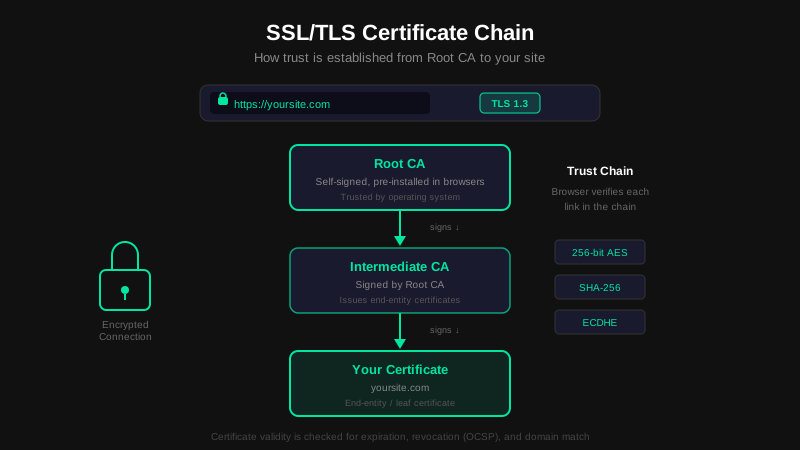
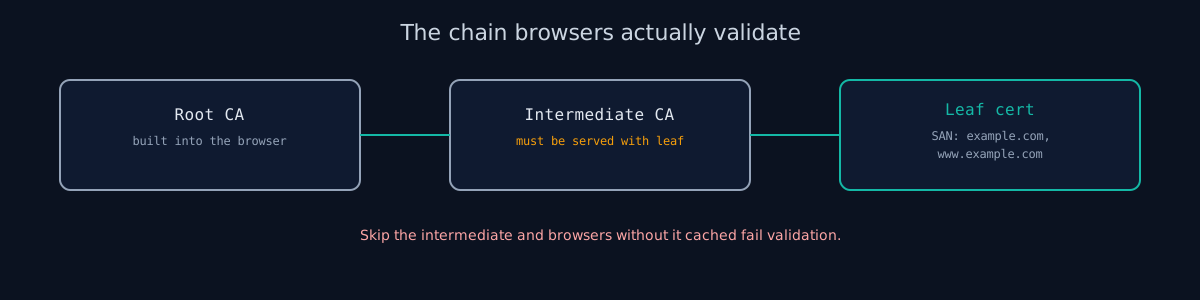
upgrade-insecure-requestsCSP directive. Browsers block mixed active content (scripts, iframes) by default. - Incomplete certificate chain - Server sends its leaf certificate but not the intermediate CA. Browsers that do not have the intermediate cached will fail validation. Serve the full chain: leaf + intermediate(s). Do not include the root CA in the chain file - browsers have roots built in and including the root wastes bytes.
Mutual TLS and Client Certificate SANs
Standard TLS authenticates the server to the client. Mutual TLS (mTLS) also authenticates the client to the server - the client presents a certificate that the server validates. This is common in microservice architectures, zero-trust networks, and API security where API keys alone are not sufficient.
Client certificates also use the SAN extension. The SANs in a client cert typically carry an email address (email:service@example.com) or a URI (URI:spiffe://cluster.example.com/ns/default/sa/myservice) rather than a DNS name. SPIFFE (Secure Production Identity Framework For Everyone) uses the SAN URI field to encode workload identity in exactly this format.
Generate a client certificate CSR for mTLS:
# openssl.cnf for client cert
cat > client.cnf << EOF
[req]
default_bits       = 2048
prompt             = no
default_md         = sha256
distinguished_name = dn
req_extensions     = req_ext

[dn]
CN = my-service

[req_ext]
subjectAltName = URI:spiffe://cluster.example.com/ns/default/sa/my-service
extendedKeyUsage = clientAuth
EOF

openssl req -new -newkey rsa:2048 -nodes   -keyout client.key   -out client.csr   -config client.cnf
The extendedKeyUsage = clientAuth marks this certificate for client authentication. A server certificate needs serverAuth instead (or both). Configuring Nginx to require client certificates:
ssl_client_certificate /etc/nginx/ssl/ca.crt;
ssl_verify_client on;
ssl_verify_depth 2;
Let's Encrypt: Automated SAN Provisioning
Let's Encrypt issues DV certificates free, using the ACME protocol (RFC 8555). It automatically includes all specified domains as SANs. The standard client is Certbot:
# Install Certbot with Nginx plugin (Ubuntu/Debian)
sudo apt install certbot python3-certbot-nginx

# Issue cert covering root domain and www - both become SANs automatically
sudo certbot --nginx -d example.com -d www.example.com -d api.example.com

# Test auto-renewal
sudo certbot renew --dry-run
Certificates expire after 90 days - short lifetimes limit damage from key compromise. Certbot installs a systemd timer for automatic renewal. Adding a new subdomain later means re-running Certbot with the additional -d flag; it re-issues the cert with all SANs combined.
For wildcard certificates, DNS validation is required (you cannot do HTTP-01 for wildcards). Use the --preferred-challenges dns flag with a DNS plugin for your provider:
# Wildcard cert via DNS validation (Cloudflare example)
sudo certbot certonly   --dns-cloudflare   --dns-cloudflare-credentials ~/.secrets/cloudflare.ini   -d example.com   -d "*.example.com"
If you are behind a CDN (Cloudflare, Vercel, AWS CloudFront), the CDN handles certificate provisioning automatically. You do not run Certbot. The CDN uses its own ACME client to issue and renew certs with the correct SANs.
TLS Versions and HSTS
Getting SANs right is the foundation. Two other configuration items determine whether your TLS setup is actually secure:
TLS version: TLS 1.3 (RFC 8446) is the current standard. It uses a 1-round-trip handshake (vs. 2 in TLS 1.2), mandatory forward secrecy, and only 5 cipher suites - all AEAD, no room for misconfiguration. Disable TLS 1.0 and 1.1 entirely; they were deprecated in RFC 8996 and no modern browser requires them.
# Check which TLS versions your server supports
openssl s_client -connect example.com:443 -tls1_3   # exits 0 if TLS 1.3 works
openssl s_client -connect example.com:443 -tls1_1   # should fail
HSTS preload: HTTP Strict Transport Security (RFC 6797) tells browsers to always use HTTPS. The first-visit gap - where HTTP is possible before the browser has seen an HSTS header - is closed by the preload list, which hardcodes your domain into the browser binary. Requirements: valid cert on the bare domain, HTTP-to-HTTPS redirect, and this header:
Strict-Transport-Security: max-age=31536000; includeSubDomains; preloadSubmit at hstspreload.org. Warning: removal takes months. Verify every subdomain works over HTTPS before submitting, because includeSubDomains applies the policy to everything under your domain.
Test Your TLS
Our scanner checks TLS version, certificate validity, SAN coverage, expiration date, chain completeness, and HSTS configuration. You get a pass/fail for each check with specific fix instructions.
Check your website right now
200+ security checks in 60 seconds. Free, no signup required.
Scan My Website (Free)Claude AI helped me with phrasing and proofreading in this article.
ismycodesafe.com Security Team
We run automated security scans on thousands of websites daily, combining static analysis, SSL/TLS inspection, header auditing, and CVE lookups. Our team tracks OWASP, NIST, and evolving compliance requirements (GDPR, NIS2, PCI DSS) to keep these guides accurate and practical.
Related Articles
The Complete Guide to Web Security in 2026
The pillar guide covering TLS, headers, CORS, cookies, and HTTPS enforcement.
What Are HTTP Security Headers and Why They Matter
CSP, HSTS, and 5 other headers that block attacks at the browser level.
OWASP Top 10 (2021): Every Vulnerability Explained
A02 Cryptographic Failures covers weak TLS and certificate issues.