HTTP Security Header Checker
Instantly check which HTTP security headers your site uses. Detects missing CSP, HSTS, X-Frame-Options, and information leaks.
What are HTTP security headers?
Every time a browser requests a page, the server responds with HTTP headers before the actual HTML arrives. Most of these headers are mundane. Content type, cache duration, encoding. But a handful of them act as security directives that fundamentally change how the browser treats your content.
Content-Security-Policy tells the browser exactly which scripts, styles, and resources are allowed to load. See the full specification at MDN. Without it, any injected <script> tag runs with full privileges. Strict-Transport-Security forces HTTPS and prevents SSL-stripping attacks. X-Frame-Options blocks clickjacking by refusing to render your page inside an iframe on a malicious domain.
The problem? These headers are opt-in. Servers don't send them by default. The OWASP Secure Headers Project documents best practices for each one. If your Nginx config, Apache .htaccess, or Express middleware doesn't explicitly set them, they simply don't exist in the response. And the browser falls back to its most permissive behavior. That gap is exactly what attackers exploit.
Our checker sends a real HTTP request to your URL, parses every response header, and flags what's missing. Read our complete guide to HTTP security headers for an in-depth walkthrough.
Headers we check
The tool evaluates seven security-critical headers and flags information-leaking headers that expose your server stack.
| Header | Purpose | Severity if missing |
|---|---|---|
| Content-Security-Policy | Controls which resources the browser may load. Primary defense against XSS and data injection. | Critical |
| Strict-Transport-Security | Forces HTTPS-only connections per RFC 6797. Prevents SSL stripping and cookie hijacking over HTTP. | Critical |
| X-Frame-Options | Prevents your page from being embedded in iframes. Blocks clickjacking attacks. | High |
| X-Content-Type-Options | Stops browsers from MIME-sniffing responses away from the declared content type. | High |
| Referrer-Policy | Controls how much referrer information the browser sends with requests. Prevents URL-based data leaks. | Medium |
| Permissions-Policy | Restricts which browser features (camera, microphone, geolocation, payment) your page can use. See the W3C Permissions Policy spec. | Medium |
| Cross-Origin-Opener-Policy | Isolates your browsing context from cross-origin popups. Prevents Spectre-class side-channel attacks. | Medium |
Need to build a CSP from scratch? Try our visual CSP generator with platform presets for Next.js, WordPress, and React.
How to fix missing security headers
The exact syntax depends on your web server or framework. Below are copy-paste examples that add all seven headers. Adjust the CSP directive values to match your actual resource origins. The examples use a strict baseline.
Nginx
server {
    # Prevent XSS. Restrict resource origins
    add_header Content-Security-Policy "default-src 'self'; script-src 'self'; style-src 'self' 'unsafe-inline'; img-src 'self' data:; font-src 'self'; connect-src 'self'; frame-ancestors 'self';" always;

    # Force HTTPS for 1 year, include subdomains
    add_header Strict-Transport-Security "max-age=31536000; includeSubDomains; preload" always;

    # Block framing (legacy fallback for CSP frame-ancestors)
    add_header X-Frame-Options "SAMEORIGIN" always;

    # Prevent MIME-type sniffing
    add_header X-Content-Type-Options "nosniff" always;

    # Limit referrer data to same-origin
    add_header Referrer-Policy "strict-origin-when-cross-origin" always;

    # Disable unnecessary browser features
    add_header Permissions-Policy "camera=(), microphone=(), geolocation=(), payment=()" always;

    # Isolate browsing context
    add_header Cross-Origin-Opener-Policy "same-origin" always;

    # Hide server version
    server_tokens off;
}
Apache (.htaccess)
<IfModule mod_headers.c>
    Header set Content-Security-Policy "default-src 'self'; script-src 'self'; style-src 'self' 'unsafe-inline'; img-src 'self' data:; font-src 'self'; connect-src 'self'; frame-ancestors 'self';"
    Header set Strict-Transport-Security "max-age=31536000; includeSubDomains; preload"
    Header set X-Frame-Options "SAMEORIGIN"
    Header set X-Content-Type-Options "nosniff"
    Header set Referrer-Policy "strict-origin-when-cross-origin"
    Header set Permissions-Policy "camera=(), microphone=(), geolocation=(), payment=()"
    Header set Cross-Origin-Opener-Policy "same-origin"

    # Remove server info headers
    Header unset Server
    Header unset X-Powered-By
</IfModule>
Express / Node.js (helmet)
import helmet from "helmet";

app.use(
  helmet({
    contentSecurityPolicy: {
      directives: {
        defaultSrc: ["'self'"],
        scriptSrc: ["'self'"],
        styleSrc: ["'self'", "'unsafe-inline'"],
        imgSrc: ["'self'", "data:"],
        fontSrc: ["'self'"],
        connectSrc: ["'self'"],
        frameAncestors: ["'self'"],
      },
    },
    strictTransportSecurity: {
      maxAge: 31536000,
      includeSubDomains: true,
      preload: true,
    },
    frameguard: { action: "sameorigin" },
    referrerPolicy: { policy: "strict-origin-when-cross-origin" },
    crossOriginOpenerPolicy: { policy: "same-origin" },
    // helmet strips X-Powered-By automatically
  })
);
Next.js / Vercel (next.config.js)
// next.config.js
const securityHeaders = [
  { key: "Content-Security-Policy", value: "default-src 'self'; script-src 'self'; style-src 'self' 'unsafe-inline'; img-src 'self' data:; font-src 'self'; connect-src 'self'; frame-ancestors 'self';" },
  { key: "Strict-Transport-Security", value: "max-age=31536000; includeSubDomains; preload" },
  { key: "X-Frame-Options", value: "SAMEORIGIN" },
  { key: "X-Content-Type-Options", value: "nosniff" },
  { key: "Referrer-Policy", value: "strict-origin-when-cross-origin" },
  { key: "Permissions-Policy", value: "camera=(), microphone=(), geolocation=(), payment=()" },
  { key: "Cross-Origin-Opener-Policy", value: "same-origin" },
];

module.exports = {
  async headers() {
    return [{ source: "/(.*)", headers: securityHeaders }];
  },
};
What the score means, using our own site
The number at the top of a result is a count and nothing more: seven headers, each either sent or not, all worth one point. No weighting, no letter grade. Missing CSP and missing Cross-Origin-Opener-Policy both cost one point, which says nothing about which gap you should close first, so look at the names in the Missing list before you look at the number.
Our own homepage, checked 2026-10-04:
6/7 security headers present
Missing:  Cross-Origin-Opener-Policy
Leaks:    Server: Vercel
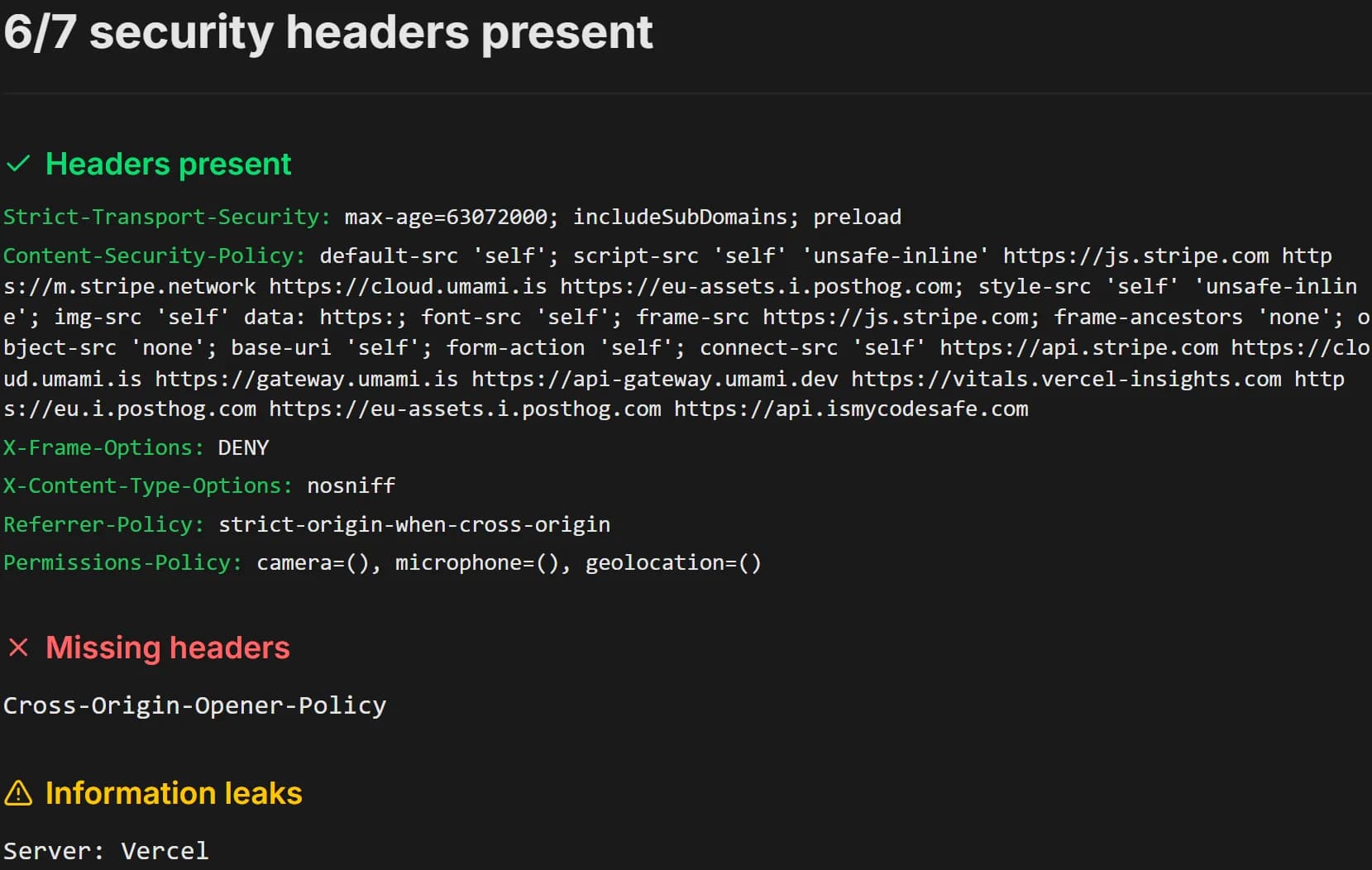
We could have picked a cleaner example, but this one shows the tool doing its job. COOP is a one-line fix we haven't shipped, and Vercel adds a Server header we haven't stripped. The six present headers include a CSP that still allows 'unsafe-inline' on static pages (the CSP guide explains why), and the checker counts it as present all the same, because it tests whether a header is sent, not whether its value is strict. Leaks are listed but never scored. Server: Vercel tells an attacker very little. Server: nginx/1.18.0 tells them which advisories to read.
Which response gets checked. The checker sends one request to the URL you enter, follows redirects, and reads the headers on the final response. If example.com redirects to www.example.com, you see the www headers. The redirect response itself might be missing HSTS, and this check won't show it. Headers can also differ per path, because an API route, a static asset and an HTML page often go through different config. Check the URLs that matter, not just the homepage.
For what each header does and copy-paste config, the security headers guide covers all seven. The Referrer-Policy row trips people up most often. strict-origin-when-cross-origin is the browser default, and it is not a CORS error.
Common header mistakes
Setting headers incorrectly can be worse than not setting them at all. It gives a false sense of security. These are the mistakes we see most often.
CSP with 'unsafe-inline' and 'unsafe-eval'
Adding these keywords to script-src defeats the entire purpose of CSP. If inline scripts are allowed, an XSS payload runs just fine. Use nonces or hashes instead.
HSTS max-age too short
Setting max-age=86400 (one day) leaves a 24-hour window after each visit where SSL stripping works. Use at least 31536000 (one year). The HSTS preload list requires this minimum.
Missing 'always' flag in Nginx
Without the 'always' parameter, Nginx only adds headers on 2xx and 3xx responses. Error pages (4xx, 5xx) are served without security headers. Exactly the pages an attacker might trigger.
Setting X-Frame-Options but not frame-ancestors
X-Frame-Options is deprecated in favor of CSP frame-ancestors. Modern browsers ignore X-Frame-Options when CSP is present, so you need frame-ancestors in your CSP directive.
CDN stripping custom headers
Some CDNs and reverse proxies strip non-standard headers or override security headers with their own defaults. Always verify headers at the edge, not just at origin. Use this tool after deploying.
Referrer-Policy set to 'no-referrer'
While maximum privacy, this breaks analytics, CSRF tokens that check the Referer header, and OAuth redirects. 'strict-origin-when-cross-origin' is the pragmatic choice for most sites.
Frequently asked questions
What are HTTP security headers?+
Which security headers does this tool check?+
Why does a weak CSP still count as present?+
Is Content-Security-Policy really necessary?+
What does Strict-Transport-Security (HSTS) do?+
Should I remove the Server and X-Powered-By headers?+
How do I add security headers to my site?+
What is the difference between X-Frame-Options and CSP frame-ancestors?+
Does this tool store my scan results?+
Which URL does the checker actually test?+
How often should I check my security headers?+
Related tools
CSP Generator
Build a Content-Security-Policy header visually with platform presets for Next.js, WordPress, and React. Copy-paste ready for six frameworks.
SSL/TLS Checker
Analyze your SSL certificate chain, protocol versions, cipher suites, and vulnerabilities like Heartbleed and CRIME. Powered by SSLyze.
Cookie Analyzer
Check cookies for Secure, HttpOnly, SameSite attributes and identify tracking or session cookies that lack proper security flags.
DNS Checker
Audit SPF, DKIM, DMARC, and CAA records, plus nameserver and MX configuration for email spoofing risks.
Want a full security audit?
Security headers are just one layer. Our full website security scan also checks SSL/TLS configuration, open ports, exposed sensitive files, DNS records, technology stack vulnerabilities, and more. Enter your URL on the homepage to get a full AI-generated security report.
Run a full security scanLearn more about cross-site scripting (XSS) and how security headers prevent it.
Need the full picture?
Run a complete security audit with 150+ checks, OWASP Top 10, and CVE lookup.
Run Full Scan