strict-origin-when-cross-origin Is Not Your Error
The line DevTools shows next to your failed request, what it actually controls, and where the real error usually is.

Key Takeaway
strict-origin-when-cross-origin is a Referrer-Policy value, and it has been the browser default in Chrome since version 85 and Firefox since 87. It sends the full URL to your own site, only the origin to other HTTPS sites, and nothing to plain HTTP. If a request failed, the cause is somewhere else in the response, usually CORS.
Your fetch call failed. You opened DevTools, clicked the request, and under General there's a line that reads Referrer Policy: strict-origin-when-cross-origin, sitting right above a red status. It looks like the error message.
It isn't. That line shows up on every request, successful ones included. It tells you which referrer rule the browser applied, and it says nothing about why the request failed.
What strict-origin-when-cross-origin means
strict-origin-when-cross-origin is one of eight values for the Referrer-Policy header. It controls how much of the current page's URL the browser puts in the Referer header (yes, the header name is misspelled in the HTTP spec) when it requests something else. With this value:
| From | To | Referer sent |
|---|---|---|
https://shop.example/cart?id=42 | https://shop.example/api/price (same origin) | https://shop.example/cart?id=42 (full URL) |
https://shop.example/cart?id=42 | https://api.partner.example/ (other origin, HTTPS) | https://shop.example/ (origin only) |
https://shop.example/cart?id=42 | http://old.partner.example/ (HTTPS to HTTP) | nothing |
http://intranet.local/page | http://other.local/ (HTTP to HTTP, other origin) | http://intranet.local/ (origin only) |
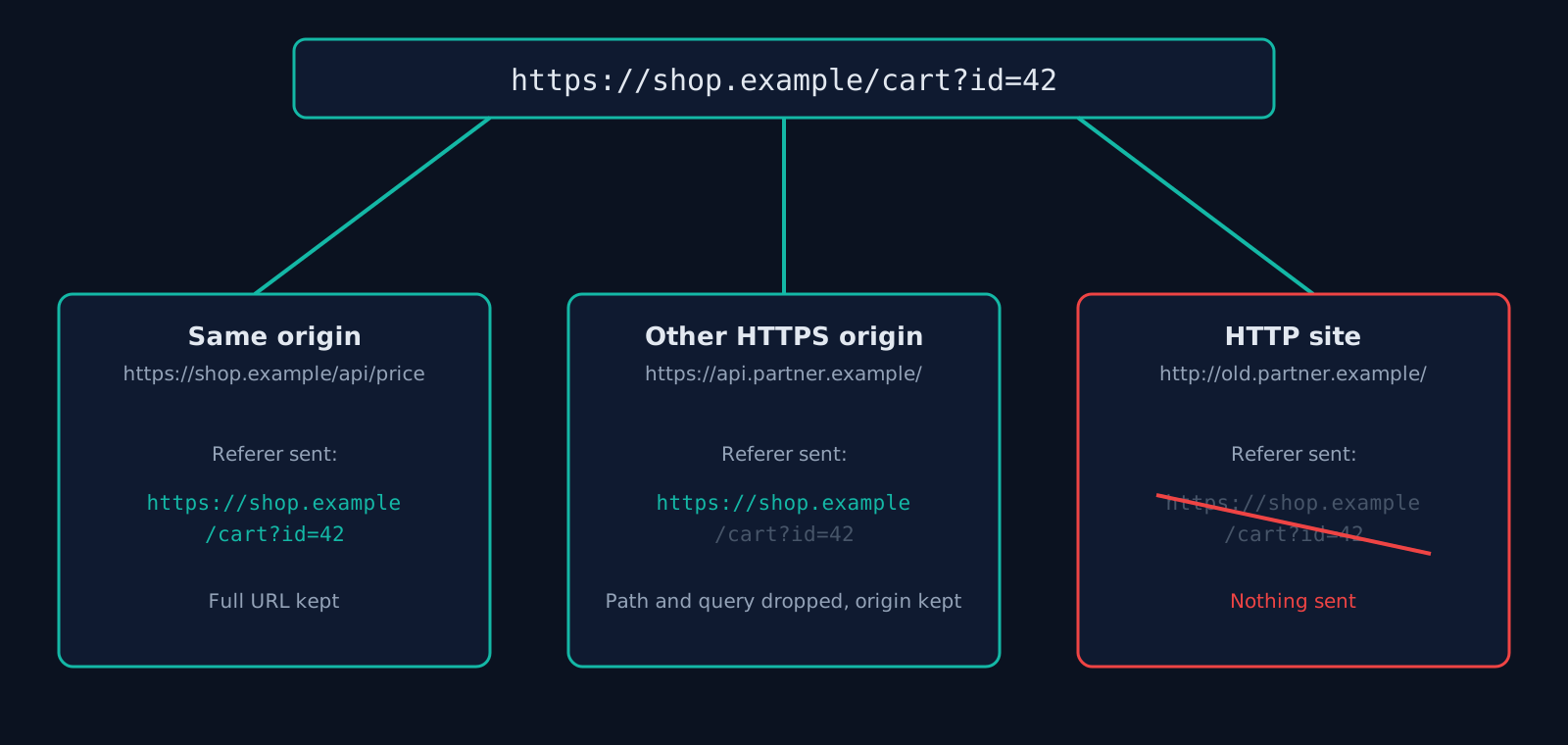
The "strict" part is the third row: never downgrade, never send anything from a secure page to an insecure one. The "when cross-origin" part is the second row: strip path and query string when leaving your site. Paths and query strings are where reset tokens, order IDs and email addresses tend to end up, and this is the leak the default closes.
Why you see it when you never set it
Browsers switched their default. Chrome made strict-origin-when-cross-origin the fallback in version 85, and Firefox followed in version 87. Before that, the default was no-referrer-when-downgrade, which sent the full URL to any HTTPS site. So if your server sends no Referrer-Policy header at all, DevTools still shows this value, because it's the one the browser picked for you.
So what is the real error?
If the request failed and the console mentions CORS, the referrer is irrelevant. CORS works on the Origin header, a separate header the browser sends on cross-origin requests regardless of the referrer policy. Check the response instead:
- No
Access-Control-Allow-Originon the response. The API has to name your origin (or*). Look at the response headers in the same DevTools panel, not the request. - The preflight failed. Requests with custom headers or JSON bodies trigger an
OPTIONSrequest first. If the server answers that with 404 or 405, the real request is never sent. Filter the Network tab onOPTIONS. - Credentials plus a wildcard.
fetch(url, { credentials: "include" })won't acceptAccess-Control-Allow-Origin: *. The server has to echo the exact origin and sendAccess-Control-Allow-Credentials: true.
MDN's CORS guide walks through each of those in more depth.
There is one case where the referrer policy really does break something: an API that authorizes by Referer. Google Maps Platform keys restricted to specific websites check the referrer. With strict-origin-when-cross-origin the origin still goes along, so a restriction on https://shop.example/* keeps working. Switch your site to no-referrer and those requests fail with an authorization error that looks unrelated.
Should you set it explicitly anyway?
Yes, and it costs one line. The default only applies when the browser has a default, and older embedded browsers and in-app webviews don't always have the same one. An explicit header also stops a stray <meta name="referrer"> in a third-party template from quietly loosening things.
This site sets it in next.config.ts, even though modern browsers would choose the same value without it (internal data from ismycodesafe.com, checked 2026-10-04). It's also one of the headers founders skip most. In our scan of Y Combinator startups, 87% of the first cohort sent no Referrer-Policy, and the W26 batch still sat at 74%. The header checker shows whether your live responses carry it, next to the other six headers from the security header guide.
Nginx
add_header Referrer-Policy "strict-origin-when-cross-origin" always;Apache
Header always set Referrer-Policy "strict-origin-when-cross-origin"Next.js (next.config.ts)
async headers() {
  return [{ source: "/(.*)", headers: [{ key: "Referrer-Policy", value: "strict-origin-when-cross-origin" }] }];
}
Vercel (vercel.json)
{ "headers": [{ "source": "/(.*)", "headers": [{ "key": "Referrer-Policy", "value": "strict-origin-when-cross-origin" }] }] }Just one page, without server access
<meta name="referrer" content="strict-origin-when-cross-origin">When a different value fits better
For most sites the default is the right answer. The two worth considering:
no-referrerfor pages whose URL itself is sensitive: password reset links, magic-link logins, document share URLs. Nothing leaves the page, including to images and scripts it loads. Watch for referrer-restricted API keys, as above.same-originif you want full referrers for your own analytics but don't want to tell any other site where visitors came from.
You don't have to change the whole site to protect one link. <a href="..." rel="noreferrer"> drops the referrer for that link, and referrerpolicy="no-referrer" works on <a>, <img>, <script> and <iframe>. fetch() accepts a referrerPolicy option per call. The full list of eight values is in the W3C Referrer Policy spec and on MDN. I've never seen a good reason for unsafe-url, which sends the full URL everywhere, plain HTTP included.
Frequently Asked Questions
- Is strict-origin-when-cross-origin a CORS error?
- No. It's the Referrer-Policy the browser applied to the request, and DevTools shows it on successful requests too. CORS failures come from missing or wrong Access-Control-Allow-* headers on the response.
- Is strict-origin-when-cross-origin the default?
- Yes, in current Chrome, Edge and Firefox when the site sends no Referrer-Policy. Chrome changed the default in version 85, Firefox in version 87.
- Does strict-origin-when-cross-origin affect SEO or analytics?
- Search engines aren't affected. Analytics on other sites will see your origin as the referrer but not the exact page. Your own analytics still get full URLs for internal navigation.
- What's the difference between strict-origin and strict-origin-when-cross-origin?
- strict-origin sends only the origin on every request, including within your own site. strict-origin-when-cross-origin sends the full URL within your site and the origin elsewhere. Both send nothing from HTTPS to HTTP.
Check your website right now
200+ security checks in 60 seconds. Free, no signup required.
Scan My Website (Free)Claude AI helped me with phrasing and proofreading in this article.
ismycodesafe.com Security Team
We run automated security scans on thousands of websites daily, combining static analysis, SSL/TLS inspection, header auditing, and CVE lookups. Our team tracks OWASP, NIST, and evolving compliance requirements (GDPR, NIS2, PCI DSS) to keep these guides accurate and practical.
Related Articles
X-Frame-Options & HTTP Security Headers
The full seven-header set with copy-paste configs for Nginx, Apache and Vercel.
What Is CSP: The Header That Decides Which Scripts Run
Directives, nonces, a safe Report-Only rollout, and configs for Nginx, Apache, Vercel and Next.js.
The Complete Guide to Web Security in 2026
The pillar guide covering TLS, headers, CORS, cookies, and HTTPS enforcement.
94% of YC startups ship with missing security headers (2026 audit)
Original research: we scanned 100 Y Combinator companies. Full per-header breakdown and raw CSV.