React Security Scanner
React apps ship security problems that generic scanners miss: source maps left in production expose your full codebase, vulnerable npm packages ship to every visitor's browser, and hardcoded API keys end up in the compiled bundle. Our scanner catches the HTTP-layer risks before attackers do.
Scan My React App. FreeNo signup · No credit card · Scan runs in 60 seconds, verify your email to view results
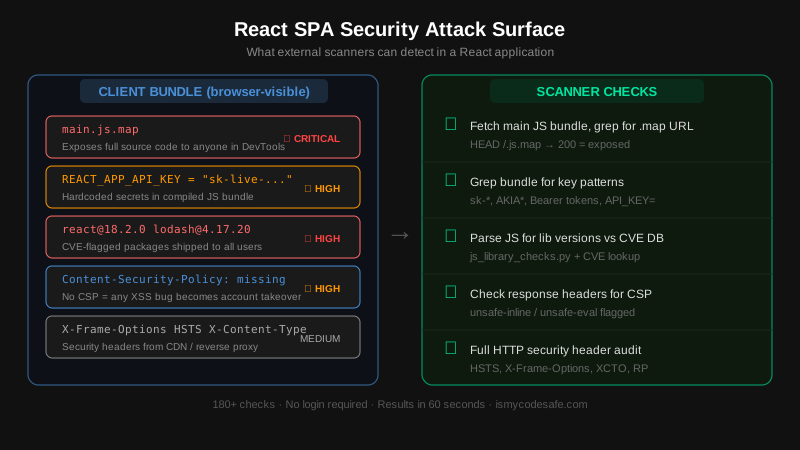
What the scanner checks
Source map exposure
Tests if .js.map files are publicly accessible in production. Exposed source maps hand attackers your full unminified source code - component names, business logic, internal API endpoints - directly from the browser.
Vulnerable JavaScript libraries
Parses your client-side bundle to identify React, lodash, axios, and other packages. Matches detected versions against the CVE database including recent React Server Component vulnerabilities (CVE-2025-55182, CVE-2026-23864).
Hardcoded secrets in client bundle
Scans the compiled JavaScript bundle for API key patterns (Bearer tokens, AWS AKIA*, Stripe sk-live-*, and similar). Anything bundled into client-side JS is visible to every visitor with DevTools open.
Content-Security-Policy for SPAs
Validates the CSP header for your React app. Detects unsafe-inline and unsafe-eval directives that nullify XSS protection. A missing or weak CSP means a single XSS bug in a dependency becomes a full account takeover.
HTTP security headers
Audits all seven critical security headers: HSTS, X-Content-Type-Options, X-Frame-Options, Referrer-Policy, Permissions-Policy, and Cross-Origin-Opener-Policy. These come from your CDN or server, not React itself.
SSL/TLS and HTTPS enforcement
Checks certificate validity, expiry, protocol version (TLS 1.2+), and whether HTTP traffic is redirected to HTTPS. React apps on expired or self-signed certs break the trust chain for everything above.
React Security Is a Bundle Problem, Not a Framework Problem
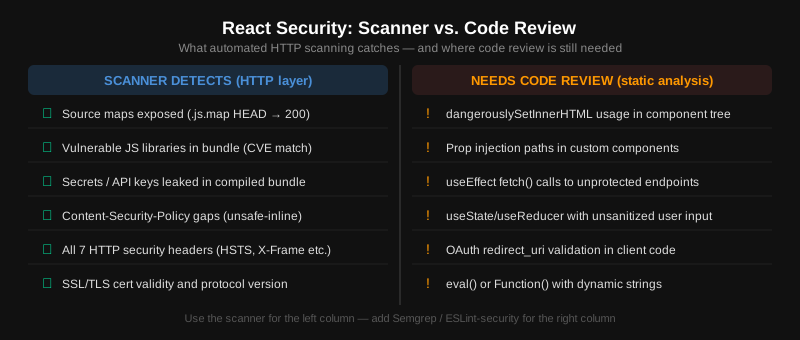
React does one thing well: it renders UI safely. The JSX compiler HTML-encodes output by default, and dangerouslySetInnerHTML exists precisely to make developers think twice before bypassing that. What React does not do is control what ends up in your production bundle, what HTTP headers your server sends, or whether your build pipeline strips source maps.
The most common React security failures are not React bugs - they are deployment configuration failures. Source maps stay on (productionSourceMaps: true in Create React App). Environment variables get moved from server config into the bundle (REACT_APP_SECRET prefix). Dependencies accumulate CVEs because npm audit is skipped in CI. None of these require an attacker to exploit React directly - they just require fetching a public URL.
The CVEs that matter most for React in 2026 are in the server-rendering layer, not the client. CVE-2025-55182 (CVSS 10.0) and CVE-2026-23864 affect React Server Functions used by frameworks like Next.js - they do not affect a standard React SPA served as static files. If your app uses server-side rendering or React Server Components, the attack surface expands significantly. Our scanner tests the HTTP boundaries of both. For deep Next.js-specific checks, see the Next.js security scanner.
Frequently Asked Questions
How do I check if my React app exposes source maps?
Open Chrome DevTools, go to the Sources tab, and look for .map file entries. Or fetch your main bundle URL and append .map - if it returns a JSON file with original source code, it is exposed. Disable source maps in production by setting GENERATE_SOURCEMAP=false in Create React App, or removing the devtool setting in your webpack config. Our scanner runs this check automatically.
Can attackers see API keys in my React bundle?
Yes. Anything in the compiled JavaScript is fully visible to anyone who opens DevTools or downloads the file. In Create React App, REACT_APP_ prefixed variables are inlined at build time. In Vite, VITE_ prefixed variables go into the bundle. Store secrets server-side only and expose them through API endpoints that enforce authentication.
What Content-Security-Policy do I need for a React SPA?
At minimum: Content-Security-Policy: default-src 'self'; script-src 'self'; style-src 'self' 'unsafe-inline'; img-src 'self' data: https:. Avoid unsafe-eval entirely. For inline scripts you control, use nonces or hashes instead of unsafe-inline. Tools like CSP Evaluator can validate your policy before deployment.
Does React prevent XSS automatically?
React escapes all string content rendered via JSX by default. The risk is dangerouslySetInnerHTML, which bypasses that escaping. Also watch for: eval() or new Function() with dynamic strings, href={userInput} without URL scheme validation, and using third-party components that pass user data to innerHTML. A strong CSP is your defense in depth against any XSS that slips through.
Should I worry about CVE-2025-55182 in my React app?
CVE-2025-55182 (CVSS 10.0) affects React Server Functions - the server-side endpoint layer used by RSC-capable frameworks like Next.js, React Router v7, and Waku. If your app is a standard client-side SPA (Create React App, Vite without SSR), you are not vulnerable. If you use React with server-side rendering or a framework that supports Server Actions, patch immediately to react@19.0.1 or 19.1.2+.
Find what your React build left behind
Free, no signup. Verify your email to view the detailed report with fix instructions.
Run Free React Security ScanFree Security Tools
Run individual checks on your React site for free.
Other Stack Scanners
Running more than React? These scanners check stack-specific issues the generic scan does not look for.
Expert Help
Book a security review for your React site
30-minute consultation with a security engineer. Covers your scan results, how to fix critical issues, and what to prioritize. Free, no sales pitch.
Book Free Consultation