Flask Security Scanner
Flask gives you nothing secure by default and the deployment checklist is short - but skipping any item creates a real vulnerability. DEBUG=True in production turns your 500 error page into a remote code execution vector. Missing security headers leave every visitor exposed to clickjacking and XSS escalation. Our scanner tests each item from outside your server.
Scan My Flask App. FreeNo signup · No credit card · Scan runs in 60 seconds, verify your email to view results
What the scanner checks
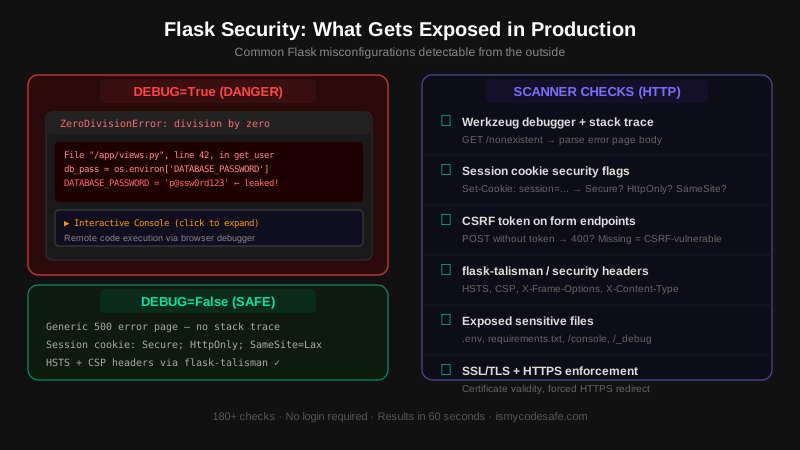
DEBUG=True and Werkzeug debugger
Triggers a 404 on a non-existent path and inspects the error page for Werkzeug stack traces, environment variable dumps, and the interactive PIN-based debugger. The Werkzeug debugger allows arbitrary Python execution - it is RCE, not just information disclosure.
Session cookie security flags
Inspects the Flask session cookie for Secure (HTTPS-only), HttpOnly (no JavaScript access), and SameSite (CSRF mitigation) flags. Flask does not set Secure by default. Missing flags expose session tokens to network interception and JavaScript-based theft.
CSRF protection via flask-wtf
Tests form-accepting POST endpoints for CSRF token validation. Sends a request without a token and checks the response code. A 200 or 302 instead of 400/403 indicates CSRF protection is absent, meaning any website can submit forms on behalf of your authenticated users.
Security headers via flask-talisman
Flask ships with zero security headers. Checks for HSTS (prevents HTTP downgrade), Content-Security-Policy (blocks XSS escalation), X-Frame-Options (prevents clickjacking), X-Content-Type-Options (blocks MIME sniffing), and Referrer-Policy. All require flask-talisman or manual middleware.
Exposed sensitive files
Tests for publicly accessible .env, requirements.txt, config.py, /console, and /_debug URLs. Flask's development server serves from the project root by default. Moving to production with the wrong working directory or misconfigured WSGI config exposes these files.
SSL/TLS and HTTPS enforcement
Checks certificate validity, expiry, and whether HTTP requests are redirected to HTTPS. Flask itself handles neither - this comes from your WSGI host (gunicorn + nginx, Railway, Heroku). The scanner verifies the enforcement is actually in place.
Flask Is Secure-by-Configuration, Not Secure-by-Default
Flask's design philosophy is explicit over implicit. It ships with the minimum to route requests and render templates - which means security is entirely opt-in. Jinja2 auto-escapes HTML by default (XSS protection), and the WSGI layer handles TLS. Everything else - CSRF protection, security headers, secure cookie flags, rate limiting - requires a deliberate choice and usually a third-party extension.
The number-one Flask production mistake is deploying with DEBUG=True. Werkzeug's debug error page shows the full Python call stack, local variable values, and environment variables - including any database password or API key stored in os.environ. Worse, the interactive console is executable: an attacker who can trigger a 500 error can run arbitrary Python on your server. Set DEBUG=False in production and use a proper logging setup instead.
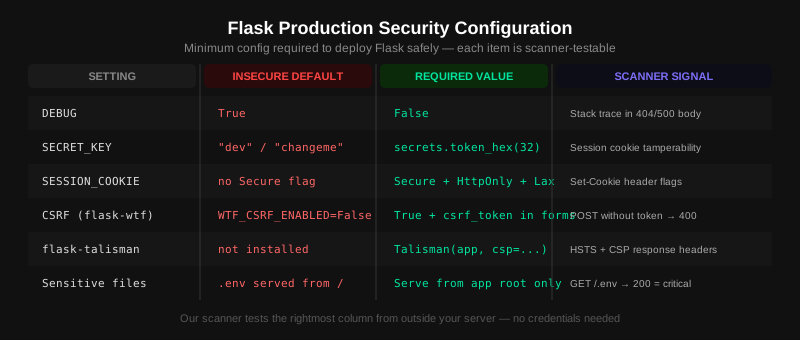
The Flask security stack for a production deployment looks like this: flask-talisman for security headers and HTTPS enforcement, flask-wtf for CSRF token generation and validation, SESSION_COOKIE_SECURE=True and SESSION_COOKIE_HTTPONLY=True for session security, and a strong random SECRET_KEY generated with secrets.token_hex(32). Our scanner tests each of these from the outside - no credentials needed.
Frequently Asked Questions
How do I check if DEBUG is False in my Flask app?
Trigger an error by visiting /nonexistent-path. If the response is an HTML page with a Python stack trace, file paths, and a console prompt, DEBUG=True. If it returns a plain 404 or your custom error template with no technical detail, DEBUG=False. Set DEBUG=False explicitly via app.config['DEBUG'] = False or FLASK_DEBUG=0 in your environment - never rely on defaults in production.
Is the Werkzeug debugger safe to run in production?
No. The Werkzeug interactive debugger is a remote code execution surface. It is PIN-protected, but the PIN is derived from predictable system values and has been bruteforced and bypassed in documented attacks (CVE-2016-10516 and variations). It is a development tool only. Set DEBUG=False and USE_DEBUGGER=False in production. Never expose port 5000 (Flask's default) to the internet.
How do I add security headers to Flask?
Install flask-talisman: pip install flask-talisman. Then wrap your app: from flask_talisman import Talisman; Talisman(app, content_security_policy={'default-src': ['self']}). This enables HSTS, forces HTTPS, and sets X-Content-Type-Options and X-Frame-Options automatically. Customize the CSP dict for your specific asset sources. Without talisman, Flask returns no security headers.
How do I add CSRF protection to Flask?
Install flask-wtf: pip install flask-wtf. Set WTF_CSRF_ENABLED=True and a strong SECRET_KEY. Add {{ form.hidden_tag() }} to every form template, or use CSRFProtect(app) for AJAX endpoints. Test it by sending a POST request without the csrf_token field - it should return 400 Bad Request. Without this, any website can silently submit forms on behalf of your logged-in users.
What SECRET_KEY should I use for Flask?
Generate it with Python: import secrets; print(secrets.token_hex(32)). This produces 64 hex characters (256 bits) of cryptographic randomness. Store it as an environment variable (SECRET_KEY in your .env or hosting config) - never hard-code it in source code. Flask uses SECRET_KEY to sign session cookies: a weak or default key ('dev', 'changeme') lets attackers forge session tokens and impersonate any user.
Deploy Flask without the configuration gaps
Free, no signup. Verify your email to view the detailed report with fix instructions.
Run Free Flask Security ScanFree Security Tools
Run individual checks on your Flask site for free.
Other Stack Scanners
Running more than Flask? These scanners check stack-specific issues the generic scan does not look for.
Expert Help
Book a security review for your Flask site
30-minute consultation with a security engineer. Covers your scan results, how to fix critical issues, and what to prioritize. Free, no sales pitch.
Book Free Consultation