Bastion Host Setup: Pre-Launch Security Checklist
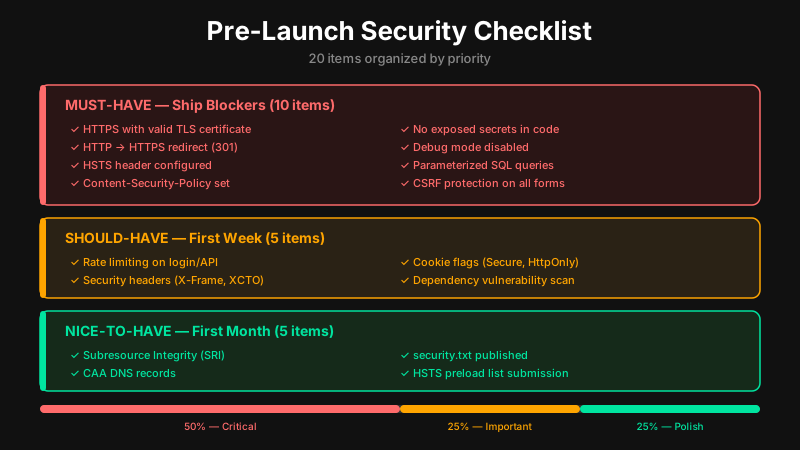
20 items to verify before going live, organized by what breaks if you skip it. Starts with bastion host and network access because everything else depends on it.
Key Takeaway
Lock down your bastion host before launch: SSH keys only, MFA enabled, inbound restricted to known IPs, and full session logging. Then pick WireGuard or OpenVPN for team access, audit your git history for secrets, and run ismycodesafe.com to catch surface-level regressions after every deploy.
Bastion Host Configuration (Ship Blockers)
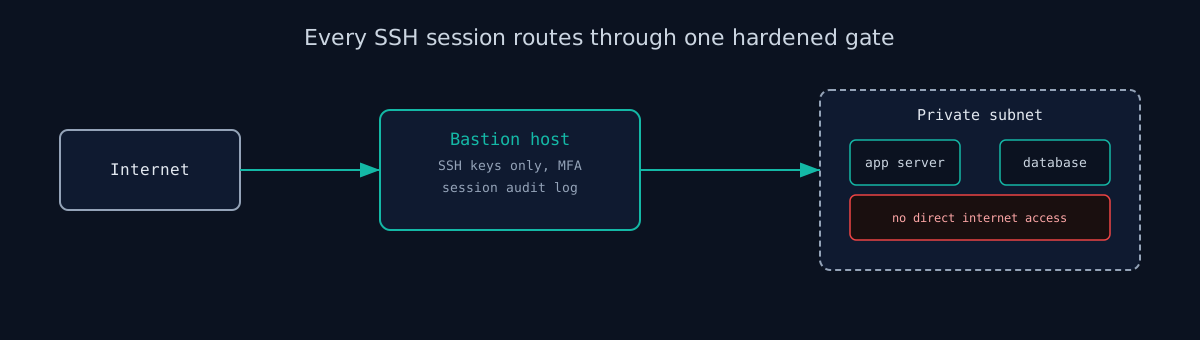
A bastion host is the single hardened VM that gates SSH access to your private infrastructure. Without one, you either expose servers directly to the internet or rely on implicit VPN trust with no per-session audit trail. Set it up before launch.
- Deploy a dedicated bastion host. One VM on a public subnet. All SSH into private resources routes through it. No exceptions for “convenience” access.
- Disable password authentication, enforce SSH keys. Set
PasswordAuthentication noin/etc/ssh/sshd_config. Restart sshd. Verify withssh -o PreferredAuthentications=password user@bastion- it must fail. - Restrict inbound SSH to known IPs only. Security group or firewall rule: port 22 open to your office IP and team member IPs. Not
0.0.0.0/0. Ever. - Enable MFA on the bastion. Install
libpam-google-authenticatorand configure PAM. A leaked key without MFA means full infrastructure access for whoever finds it. - Disable root login.
PermitRootLogin noin sshd_config. Create a named admin user. Root sessions are harder to attribute in logs. - Enable session audit logging. Install
auditdor configurepam_tty_audit. Ship logs off the bastion to CloudWatch, Loki, or your SIEM before launch. Logs on the compromised machine are useless. - Harden the bastion OS. Remove every package you didn't install intentionally. Enable
unattended-upgrades(Ubuntu) or equivalent. Apply CIS Benchmark Level 1 at minimum. - Isolate the bastion in its own security group. Outbound from bastion to private subnets: only ports your services actually need. No unrestricted egress. The bastion is not a general-purpose internet gateway.
WireGuard vs OpenVPN for Remote Access
SSH through a bastion works for individual sessions. If your team needs continuous network-level access (developers, CI/CD, monitoring), add a VPN layer. Here is how to choose between the two real options.
WireGuard runs in the Linux kernel since version 5.6. Its codebase is about 4,000 lines, which is auditable by a single engineer in a week. Configuration is minimal: generate key pairs, add peers, run wg-quick up wg0. Throughput is noticeably faster than OpenVPN. The tradeoff: no built-in certificate revocation. Revoking a user means removing their public key from the server config and reloading, which is fast but manual.
OpenVPN uses a full PKI with certificate revocation lists (CRL). Revoke a user's cert and they lose access immediately without touching the server config. GUI clients exist for non-technical team members. The codebase is large (~70,000 lines) and the config is more complex. It is the right call for regulated environments or teams that include non-engineers who need a one-click VPN client.
- Use WireGuard if your team is developer-comfortable, you want lower latency, and manual key removal on offboarding is acceptable. Start with the official quickstart.
- Use OpenVPN if you need CRL-based revocation, have non-technical users who need a GUI, or operate under compliance requirements that mandate PKI.
- Terminate VPN on the bastion or a dedicated gateway. Not on application servers. Traffic from the VPN gateway to internal services should stay in a private subnet.
- Rotate or revoke VPN credentials on offboarding. This is the most commonly skipped step. Have a runbook ready before launch so it takes under five minutes when someone leaves.
Secrets Management and Runtime Hardening
Most pre-launch security failures are not sophisticated attacks. They are committed API keys, default database passwords in production, and container images with unpatched CVEs. Fix these before you have users.
- Store secrets in a secrets manager. HashiCorp Vault, AWS Secrets Manager, GCP Secret Manager, or Doppler all work. The goal is zero secrets in environment files that get committed to git.
- Audit your git history for secrets. Run
trufflehog git file://.orgitleaks detect. A.gitignorefix does not remove secrets from previous commits. Treat anything found as compromised and rotate it immediately. - Inject secrets at runtime, not build time. Secrets passed as Docker build arguments show up in image layers and are extractable with
docker history. Use--secretmounts at build time or environment injection at container start. - Rotate database credentials before launch. Dev and staging database passwords often end up in production because they were set once and never changed. Start production with fresh credentials that nobody has seen before.
- If running Kubernetes: enable RBAC and restrict service accounts. Default service accounts often have cluster-wide access. Create per-service accounts with minimum permissions. Run
kubectl auth can-i --list --as=system:serviceaccount:default:defaultto see what your default account can do. - If running Kubernetes: scan container images before deploy. Add
trivy image <image>to your CI pipeline. Block deploys with CRITICAL CVEs. It takes ten minutes to set up and catches known vulnerabilities before they reach production. - If running Kubernetes: enable API server audit logging. Add
--audit-policy-fileto your API server config. Log atMetadatalevel for all requests,Requestlevel for sensitive verbs (create, delete, update on Secrets and RBAC resources). - Run an automated surface scan after every deploy. ismycodesafe.com runs 200+ checks in under 30 seconds covering SSL, security headers, exposed ports, OWASP paths, and known CVEs. Use it to catch regressions you introduce with each release, not just on launch day. To check just the security headers or the cookie flags on one URL, use the free tools. On Laravel, the stack-specific scan also covers .env, debug tooling and error pages.
For the full 50-item version with detailed explanations, see The Developer Security Checklist.
Check your website right now
200+ security checks in 60 seconds. Free, no signup required.
Scan My Website (Free)Claude AI helped me with phrasing and proofreading in this article.
ismycodesafe.com Security Team
We run automated security scans on thousands of websites daily, combining static analysis, SSL/TLS inspection, header auditing, and CVE lookups. Our team tracks OWASP, NIST, and evolving compliance requirements (GDPR, NIS2, PCI DSS) to keep these guides accurate and practical.
Related Articles
The Developer Security Checklist: 50 Things to Verify
The complete 50-item checklist for full coverage.
How to Read a Vulnerability Report
Understanding scan results and CVSS scores.
Password Hashing: Salts, bcrypt, and Argon2
Item 14 on this list in full: which algorithm, which cost factor, and how to migrate an existing user table.
Session Hijacking and How to Prevent It
Cookie flags and rotation policy to set before the first real login hits production.