NVD CVSS Scores Explained: How to Read Vulnerability Reports With CVSS v3.1, v4.0 and EPSS
The National Vulnerability Database (NVD) is where every CVE entry lives. Here is what each field means, whose CVSS score you are actually looking at, what changed with CVSS v4.0, and how EPSS tells you whether anyone is exploiting the bug right now.
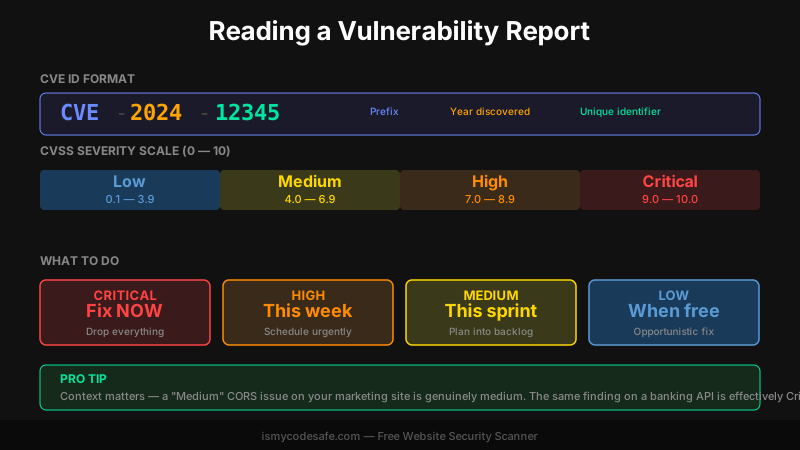
Key Takeaway
An NVD entry can carry two CVSS scores: NIST's (Primary) and the CNA's (Secondary). Since April 15, 2026, NIST only enriches priority CVEs and no longer re-scores CVEs the CNA already scored, so many new entries show just the CNA score or none at all. Read the version (v3.1 or v4.0) and the source before you trust the number, then add EPSS: a Medium CVSS score with EPSS above 0.1 should be treated as High.
What Is the NVD?
The National Vulnerability Database (NVD) is NIST's public repository of known software vulnerabilities. When a CVE ID is assigned, by MITRE or by a CVE Numbering Authority (CNA) such as a software vendor, the NVD lists it and, for the CVEs NIST gets to, adds CVSS scores, affected product ranges and remediation references. NIST calls that step enrichment.
When your security scanner reports CVE-2024-12345 with a score of 8.1, that number usually came from the NVD record, but not always from NIST itself. Every entry has the same structure: a plain-language description, one or more CVSS base scores with their vector strings, and a list of affected software versions in CPE (Common Platform Enumeration) format.
Why does this matter in practice? Because the NVD entry is where you find out which versions are vulnerable, whether a patch exists, and how severe the real-world impact is. The number out of ten is only one part of it.
NVD CVSS: Whose Score Are You Reading?
A lot of confusion around "the NVD CVSS score" comes from the fact that one entry can hold several. NIST scores the CVE, and the CNA that published it often scores it too. Other publishers can add one as well, such as CISA through its role as an Authorized Data Publisher (ADP). The NVD API labels them: NIST's score has the source nvd@nist.gov and the type Primary, scores from anyone else are Secondary.
Log4Shell is a good example. When I pulled CVE-2021-44228 from the NVD API on October 7, 2026, it returned three scores:
| Version | Source | Type | Base score |
|---|---|---|---|
| CVSS v3.1 | nvd@nist.gov | Primary | 10.0 |
| CVSS v3.1 | CISA-ADP | Secondary | 10.0 |
| CVSS v2 | nvd@nist.gov | Primary | 9.3 |
Here the two v3.1 scores agree. They do not always, and a scanner that prints a single number rarely tells you which one it picked. If your report and the NVD page disagree, compare the vector strings (AV:N/AC:L/PR:N/...) rather than the totals. The vector shows exactly which assumption differs.
This matters more after April 15, 2026. NIST announced that it will "no longer routinely provide a separate severity score" for CVEs where the CNA already supplied one. For many new entries, the CNA score is the only score you get.
CVSS Base Score and Impact Score
CVSS (Common Vulnerability Scoring System) rates vulnerability severity on a 0-10 scale and is maintained by FIRST.org. Most NVD entries you meet today are still scored with CVSS v3.1, where the base score is built from two groups of metrics.
Exploitability metrics:
- Attack Vector (AV). Network (remote), Adjacent (same local network or Bluetooth range), Local (the attacker needs read/write/execute access on the system, at the keyboard or over SSH, or tricks a user into opening a file) or Physical (hands on the device). Network-based vulnerabilities are the most dangerous, since anyone on the internet can try them.
- Attack Complexity (AC). Low means no special conditions. High means the attacker needs a race condition or a specific configuration to land the exploit.
- Privileges Required (PR). None, Low (regular user) or High (admin). None is worst: it means unauthenticated attacks.
- User Interaction (UI). None means fully automated exploitation. Required means a victim must click a link or visit a page.
Impact metrics (the "impact score" portion of an NVD entry):
| Impact Dimension | What It Measures | High Means |
|---|---|---|
| Confidentiality | Can the attacker read data? | Full database access, password leaks |
| Integrity | Can they modify data? | Arbitrary writes, tampered records |
| Availability | Can they crash the system? | DoS, server crash, resource exhaustion |
A SQL injection vulnerability on a user database would score High on all three: full read, full write and potential DoS. That pushes the base score to 9+ (Critical). A missing Referrer-Policy header scores Low on confidentiality and nothing on integrity or availability, which lands in the 3-4 range (Low to Medium).
You can calculate scores yourself using the FIRST.org CVSS v3.1 Calculator.
Severity bands (identical in v3.1 and v4.0):
| Level | CVSS Range | Action |
|---|---|---|
| Critical | 9.0 - 10.0 | Fix immediately. Drop what you're doing. |
| High | 7.0 - 8.9 | Fix this week. |
| Medium | 4.0 - 6.9 | Schedule in current sprint. |
| Low | 0.1 - 3.9 | Address opportunistically. |
| None | 0.0 | No action from the score alone. |
CVSS v4.0 in the NVD
FIRST published CVSS v4.0 on November 1, 2023, and v4.0 scores now show up in NVD entries next to v3.1. The bands are the same, but the metrics underneath are not, so a v4.0 score and a v3.1 score for the same bug can differ. The changes you will notice when reading an entry:
- Scope is gone. Instead, impact is scored twice: on the vulnerable system (VC, VI, VA) and on subsequent systems (SC, SI, SA). A bug in a proxy that exposes the backend behind it shows up in the second set.
- Attack Requirements (AT) is new. It is None or Present, and captures deployment conditions the attacker cannot control, such as a race condition or a specific network position.
- User Interaction has three values: None, Passive (limited, involuntary interaction) and Active (the user has to do something specific).
- The label tells you what was scored. CVSS-B is base only, CVSS-BT adds threat metrics, CVSS-BE adds environmental metrics, CVSS-BTE uses all three. A score labelled CVSS-B ignores both exploitation in the wild and your own environment.
One caution if you cache NVD data. On April 15, 2026, NIST was alerted that about 4,500 CVE records, 19% of those with a v4.0 score, had a numerical v4.0 score higher than the correct value, and fewer than 30 had one that was too low. The vector strings were fine; only the calculated number was wrong. NIST pushed corrected records on April 28, 2026 (NVD announcement). If you mirrored v4.0 scores before that date, pull them again.
When the NVD Has No Score Yet
You will increasingly open an NVD entry and find a description with no NIST score. That is not a glitch. According to NIST, CVE submissions rose 263% between 2020 and 2025, and the NVD has carried a backlog of unenriched CVEs since early 2024, even after enriching nearly 42,000 CVEs in 2025.
Since April 15, 2026, NIST enriches these first:
- CVEs in CISA's Known Exploited Vulnerabilities (KEV) catalog, with a goal of one business day
- CVEs for software used within the US federal government
- CVEs for critical software as defined by Executive Order 14028
Everything else is still listed, but marked "Lowest Priority - not scheduled for immediate enrichment". Backlogged CVEs with an NVD publish date before March 1, 2026 moved to "Not Scheduled". You can email nvd@nist.gov to ask for a specific CVE to be enriched.
For a developer this changes the workflow. A missing NIST score means you read the CNA score and the vendor advisory instead, check whether the CVE is on the KEV list (if it is, someone is exploiting it, whatever the score says), and pull EPSS for a likelihood estimate.
EPSS: Predicting Exploit Likelihood
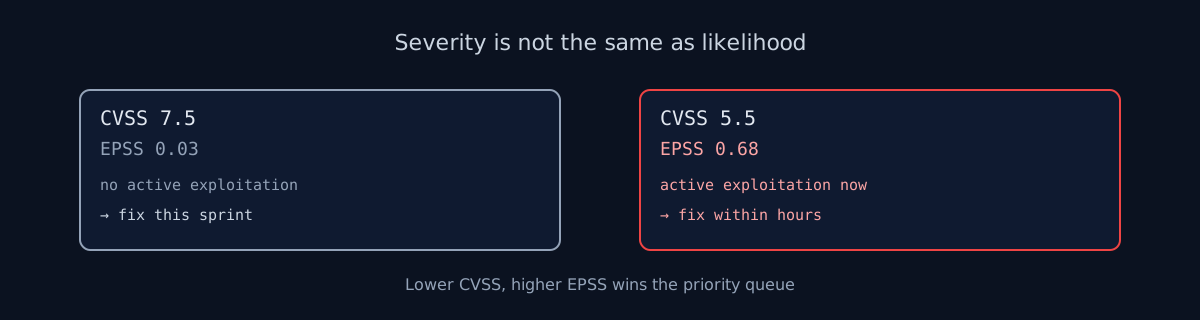
CVSS measures severity. EPSS measures probability. EPSS (Exploit Prediction Scoring System) is a machine-learning model from FIRST that estimates the probability a published CVE will be exploited in the wild in the next 30 days. It publishes a 0-1 score with a percentile for every CVE, every day.
Here is why this changes your prioritization: a CVE with CVSS 7.5 and EPSS 0.03 is lower priority than a CVE with CVSS 5.5 and EPSS 0.68. The second one is far more likely to be attacked soon, despite a lower severity score. For scale, Log4Shell had an EPSS of 0.99999 (100th percentile) on October 7, 2026, nearly five years after disclosure.
A practical rule:
- EPSS < 0.05: base priority on CVSS alone
- EPSS 0.05-0.1: watch and patch within the normal timeline
- EPSS > 0.1: treat as one severity level higher than CVSS suggests
- EPSS > 0.5: exploitation is likely; treat as Critical regardless of CVSS
These thresholds are our working rule of thumb, not something FIRST prescribes. Many scanners pull EPSS automatically and show it next to the CVSS score. If yours does not, query https://api.first.org/data/v1/epss?cve=CVE-2021-44228 with your own CVE ID.
Looking Up a CVE in the NVD Database
When a security report lists a CVE ID, this is the lookup flow:
- Go to nvd.nist.gov and search the CVE ID (e.g.
CVE-2021-44228) - Read the description and confirm your software and version are in the affected range
- Note each CVSS score with its version (v3.1 or v4.0) and its source (NIST or the CNA)
- If there is no score, check the CVE status and use the CNA or vendor score instead
- Check the CPE entries, which list exact affected versions as machine-readable identifiers
- Open the References section and find the vendor advisory or patch link
- Check the KEV catalog and EPSS if your scanner did not include them
The NVD database CPE entries are how automated scanners match CVEs to your specific stack. If your scanner reports a CVE but you are running a version outside the affected range, check the CPE list before investing time in a patch that does not apply to you. Keep in mind that CVEs NIST has not enriched may have no CPE list at all, and then version matching falls back to the vendor advisory.
Prioritizing Fixes
Use CVSS and EPSS together, and let a KEV listing override both. This table covers most situations:
| CVSS Level | EPSS | Priority |
|---|---|---|
| Any, listed in KEV | Any | Fix within hours. It is being exploited. |
| Critical (9+) | Any | Fix within hours. Not days. |
| High (7-8.9) | > 0.1 | Fix this week. |
| High (7-8.9) | < 0.1 | Fix this sprint. |
| Medium (4-6.9) | > 0.1 | Treat as High: this sprint. |
| Medium (4-6.9) | < 0.1 | Next sprint. |
| Low (0.1-3.9) | Any | Backlog. Address when touching related code. |
Context adjusts everything. A Medium CORS misconfiguration on a static marketing page is genuinely medium. The same misconfiguration on your payments API is effectively Critical: same CVSS, different blast radius. That is what the environmental metrics in CVSS are for, and only you can fill them in, because no database knows your setup.
When you run a scan with ismycodesafe.com, each finding includes the mapped CVE ID, CVSS base score and remediation guidance. Start with the Critical and High findings, look them up in the NVD database to verify your version is affected and to see whose score it is, then work down the list using the EPSS-adjusted priority above.
Check your website right now
200+ security checks in 60 seconds. Free, no signup required.
Scan My Website (Free)Claude AI helped me with phrasing and proofreading in this article.
ismycodesafe.com Security Team
We run automated security scans on thousands of websites daily, combining static analysis, SSL/TLS inspection, header auditing, and CVE lookups. Our team tracks OWASP, NIST, and evolving compliance requirements (GDPR, NIS2, PCI DSS) to keep these guides accurate and practical.