Password Hashing: Salts, bcrypt, and Argon2 Done Right
Storing passwords is one of those problems that looks solved until you read the actual code. Here is how to hash them properly, why a salt is not optional, and which algorithm to reach for.
Key Takeaway
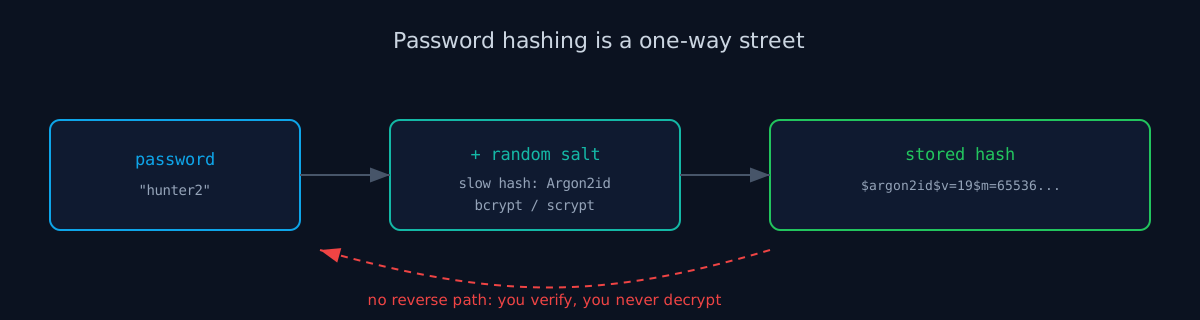
Password hashing turns a password into a fixed, irreversible value you can verify but never decrypt. Never store plaintext and never encrypt passwords. Add a unique per-user salt, use a deliberately slow algorithm (Argon2id first, then scrypt or bcrypt), and tune the work factor so a single hash takes a noticeable fraction of a second. Fast hashes like MD5 or SHA-256 are the wrong tool.
What Is Password Hashing?
Password hashing runs a password through a one-way function and stores the result, a fixed-length value called a hash, instead of the password itself. When a user logs in, you hash what they typed with the same function and check whether it matches the stored value. If it does, the password was right. At no point did you keep the password around.
The whole idea rests on one property: you can go from password to hash, but not back. That is what hashing is, in general. Feed it the same input and you always get the same output, but the output tells an attacker who steals it almost nothing about the input. For passwords, that one-way property is the entire point, because the day your database leaks, and databases leak, the hashes are all the attacker walks away with.
Hashing Is Not Encryption
This is the distinction that trips people up, so it is worth being blunt about. Encryption is reversible. It exists so that someone holding the key can get the original data back. Hashing has no key and no reverse. If your "password security" involves a decrypt step somewhere, you have built the wrong thing, because it means the plaintext password can be recovered, which means a key leak or an insider hands an attacker every account at once.
You never need to recover a password. Think about what your app actually does with one: it checks, on login, whether the submitted value matches what the user set earlier. A comparison, nothing more. A one-way hash answers that question and refuses to answer any other. Reach for hashing precisely because it can do less than encryption.
Salting: Why Identical Passwords Should Not Match
A bare hash has a problem. If two users pick the same password, they get the same hash, and an attacker who cracks one account has cracked both. Worse, attackers do not crack hashes one at a time. They precompute enormous lookup tables, called rainbow tables, that map common passwords straight to their hashes, then match your leaked database against the table in bulk.
A salt kills both attacks. You generate a unique random value for each user, combine it with the password before hashing, and store the salt next to the hash. The salt is not a secret, and it does not need to be. Its job is to make every hash unique, so the same password produces a different stored value for every account, and a precomputed table built for one salt is worthless against the next one.
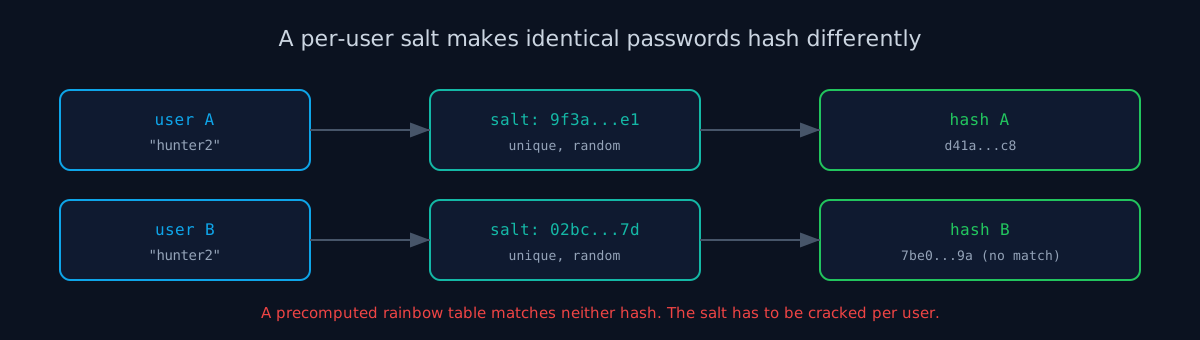
Good news: you almost never salt by hand. The algorithms below generate a salt for you, mix it in, and pack it into the output string along with their settings. Your job is to use the library correctly, not to roll the salt logic yourself.
Use a Slow Hash: Argon2, scrypt, or bcrypt
Here is the counterintuitive part. For most hashing, fast is good. For passwords, fast is the enemy. An attacker with your salted database still guesses: they take a candidate password, run it through your hash with your salt, and see if it matches. If your hash runs in a microsecond, a single GPU tries billions of candidates a second. If your hash is deliberately slow and memory-hungry, that same GPU manages a few thousand. The slowness is a feature you are buying on purpose.
That rules out MD5, SHA-1, and SHA-256 for passwords. They are fast integrity hashes, built to checksum a file quickly, and that speed is exactly wrong here. Use a password hashing function instead. The OWASP Password Storage Cheat Sheet puts the order of preference as Argon2id first, then scrypt, then bcrypt for systems that already run it.
# Python, using the argon2-cffi library
from argon2 import PasswordHasher

ph = PasswordHasher()              # sensible Argon2id defaults
stored = ph.hash("hunter2")        # salt is generated and packed in
# stored -> "$argon2id$v=19$m=65536,t=3,p=4$...$..."

# On login:
try:
    ph.verify(stored, submitted_password)
    # match. optionally re-hash if parameters are outdated:
    if ph.check_needs_rehash(stored):
        stored = ph.hash(submitted_password)
except Exception:
    # no match, reject the login
    ...
Notice what the code does not do. It does not generate a salt, concatenate strings, or pick an iteration count by hand. The library owns the salt and writes its parameters into the stored string, so verification later knows exactly how the hash was made. That is the shape you want in every language: a vetted password library doing the careful parts.
Tuning the Work Factor
Every one of these algorithms has a cost setting, the work factor. bcrypt calls it the cost or rounds. Argon2 exposes memory, iterations, and parallelism. It controls how slow a single hash is, and it is the dial you tune to keep pace with faster hardware over time.
Pick the cost by measuring on your own production hardware, not by copying a number off the internet. The usual target is somewhere around 250 to 500 milliseconds per hash. Slow enough to wreck an offline guessing run, fast enough that a login still feels instant and a burst of sign-ins does not pin your CPU. Set it too low and you have undone the point of using a slow hash. Set it absurdly high and an attacker can knock your login over by spamming it. Measure, then choose.
Upgrading Old Hashes Without a Reset
Cost settings that felt safe three years ago feel slow to a new GPU, so you will want to raise the work factor eventually, or move an old bcrypt store onto Argon2id. You cannot re-hash everyone at once, because you do not have anyone's password sitting around. That is the point of hashing.
You do get the password exactly once, though, at the moment a user logs in. So you upgrade lazily. On a successful login, check whether the stored hash uses your current algorithm and cost. If it is behind, you already hold the plaintext for this one request, so re-hash it with the new settings and overwrite the stored value. Active users migrate themselves over a few weeks. The libraries even hand you the check, like the check_needs_rehash call in the snippet above.
The Mistakes We See Most
We built ismycodesafe after watching how confidently AI-assisted code scaffolds an auth flow, and password storage is where it goes wrong in the most consistent ways. Ask a model for a signup endpoint and you will often get a tidy sha256(password), no salt, no work factor, because the prompt asked for a working feature and a fast hash is the obvious way to make one work. It runs, the tests pass, and the flaw is invisible until the database is somewhere it should not be.
- Plaintext or encrypted passwords. If a password can be read back, it will be, by a leak or an insider. Hash, never encrypt.
- A fast hash like MD5 or SHA-256. Right tool for file integrity, wrong tool for passwords. Speed helps the attacker.
- No salt, or one shared salt for everyone. A single static salt still lets identical passwords collide and lets an attacker build one table for your whole database.
- A homegrown scheme. Looping SHA-256 a thousand times or inventing your own mix is how subtle bugs get shipped. Use a vetted Argon2, scrypt, or bcrypt library.
- A work factor frozen at the default forever. Hardware gets faster. Re-hash on login and raise the cost over time.
Test Your Site
You cannot see a password hash from the outside, but you can see the scaffolding around it: a login form served over plain HTTP, missing security headers on the auth pages, session cookies without the flags that keep a stolen token from being replayed. Those are the tells that the careful work probably was not done underneath either. Our scanner probes the live surface of your site for exactly these patterns and points you at what to fix first.
Check your website right now
200+ security checks in 60 seconds. Free, no signup required.
Scan My Website (Free)Claude AI helped me with phrasing and proofreading in this article.
ismycodesafe.com Security Team
We run automated security scans on thousands of websites daily, combining static analysis, SSL/TLS inspection, header auditing, and CVE lookups. Our team tracks OWASP, NIST, and evolving compliance requirements (GDPR, NIS2, PCI DSS) to keep these guides accurate and practical.
Related Articles
Session Hijacking: How Attackers Steal Logged-In Sessions
A strong password hash does nothing if the session token it protects leaks. Here is the other half.
Input Validation: Allowlist, Server-Side, and Why It Is Not Enough
Validation is the first layer at the boundary. Hashing is the layer that protects what you store.
HTTP Security Headers and Why They Matter
The headers that keep the login form and its cookies from being the weak link.
Pre-Launch Security Checklist
Salted, slow-hashed passwords belong on this list before any auth feature ships.