SAST vs DAST: When to Use Each (and Why You Need Both)
SAST reads your source code without running it. DAST tests the running app from outside. They catch different bugs, at different stages, and the mistake is treating them as a choice.
Key Takeaway
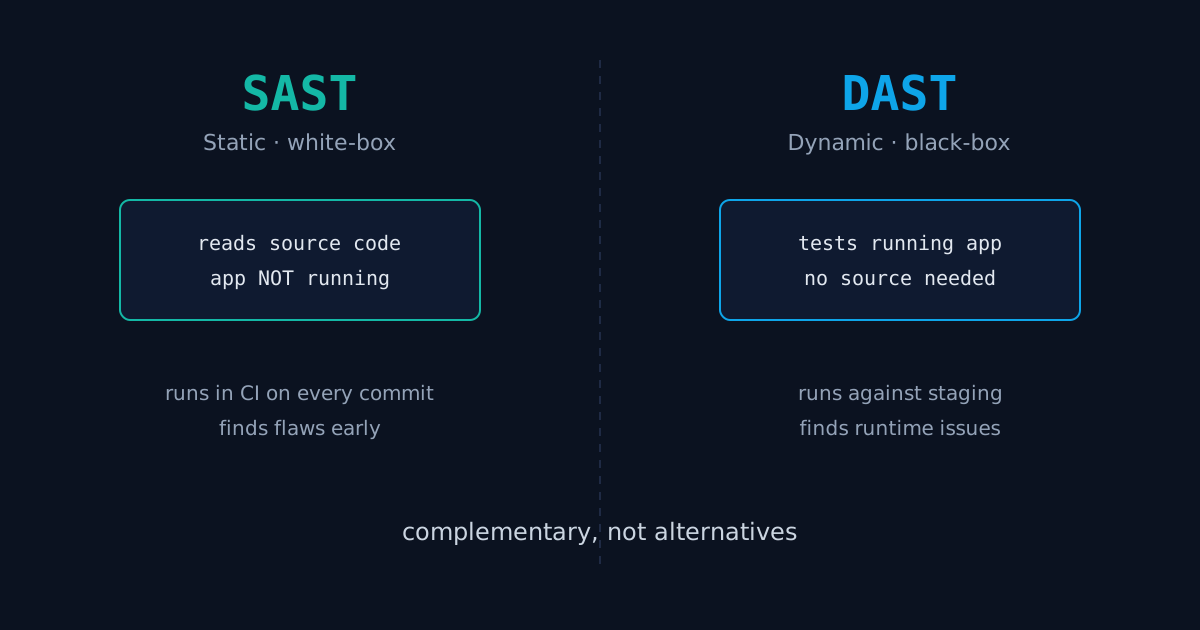
SAST analyzes source code without running it (white-box, finds flaws early); DAST tests the running app from outside (black-box, finds runtime and config issues). Run SAST in CI on every commit, run DAST against staging before release. They are complementary, not alternatives.
The Short Answer
SAST analyzes your source code without running it, so it finds flaws early, in the editor and in CI. DAST tests the running application from the outside, with no access to the code, so it finds problems that only show up at runtime. SAST is white-box. DAST is black-box. You run SAST on every commit and DAST against staging before a release. They are complementary, not alternatives, and shipping with only one leaves a gap the other would have caught.
The reason the question keeps coming up is that both are sold as "application security testing," so it sounds like you pick one. You do not. They look at different things, from different angles, at different points in the pipeline.
What Is SAST?
SAST stands for Static Application Security Testing. It reads your source code, bytecode, or binaries and looks for vulnerable patterns without ever executing the program. Because it sees the code itself, it can point to the exact file and line where the problem lives.
It is good at finding the classes of bug that are visible in the code structure:
- Injection paths where untrusted input reaches a SQL query or shell command unsanitized
- Hardcoded secrets, API keys, and credentials committed by mistake
- Use of weak or deprecated crypto functions
- Unsafe deserialization and dangerous sink functions
The trade-off is false positives. SAST sees a query built from a variable and flags it, even when the variable was validated three functions earlier in a way the analyzer could not follow. Tuning the ruleset is part of the job. The payoff is timing: a SAST finding shows up on the pull request, before the code is merged, when fixing it costs minutes instead of an incident.
What Is DAST?
DAST stands for Dynamic Application Security Testing. It tests the application while it is running, by sending real requests and observing the responses, exactly the way an attacker would. It needs no source code. It only needs a URL it can reach.
It catches the things that are invisible until the app is actually live:
- Missing or misconfigured security headers, like an absent
Content-Security-Policy - Authentication and session handling that breaks under real requests
- Server misconfiguration, exposed admin panels, and default credentials
- Reflected inputs that prove an injection is genuinely exploitable, not just theoretically present
DAST has fewer false positives on the bugs it reports, because it confirms exploitability against the live target. Its blind spot is the opposite of SAST's: it only tests the paths it can reach, so a vulnerable endpoint behind a feature flag or an unusual auth flow may never get exercised. It also runs late, against a deployed build, so a finding here is more expensive to fix than the same class of bug caught by SAST on commit.
SAST vs DAST: Side by Side
| SAST | DAST | |
|---|---|---|
| Approach | White-box, reads source | Black-box, tests running app |
| Needs source code | Yes | No |
| App running | No | Yes |
| Pipeline stage | CI, every commit | Staging, before release |
| Best at | Code-level flaws: injection paths, secrets, weak crypto | Runtime and config: headers, auth, server setup |
| Points to a line of code | Yes | No, points to a request |
| Main weakness | False positives | Only tests reachable paths |
Running Both in One Pipeline
The two tools line up cleanly along the pipeline, which is the whole reason you do not have to choose. SAST gates the commit. DAST gates the release.
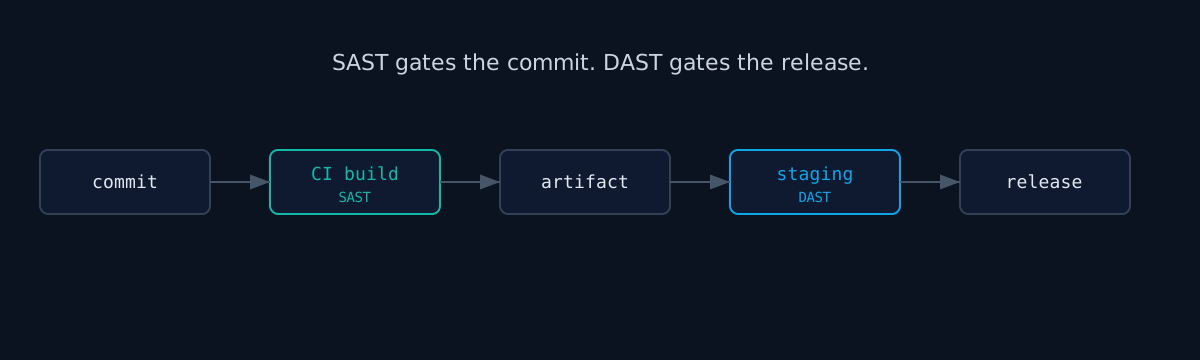
A practical setup: run SAST as a required check on every pull request, so vulnerable code cannot merge without a human looking at the finding. Then run DAST on a schedule against your staging deploy, and as a gate before promoting a build to production. The two overlap on purpose. When SAST flags a possible SQL injection and DAST later confirms the same endpoint is exploitable, you have a real bug with a known line number and a known payload. When SAST flags it but DAST cannot trigger it, you have a candidate to review, not a fire to fight. That overlap is how you cut false-positive fatigue without ignoring findings.
Scanning AI-Generated Code
This is where the two-tool argument stops being academic. A lot of code now arrives from Copilot, ChatGPT, and Claude. It compiles, it reads cleanly, and frequently nobody traced every line by hand, because the whole point was to move faster. That is exactly the input SAST was built for: it does not care who wrote the code or how confident it looks, it traces the data flow and flags the unsanitized query the model happily generated.
DAST then closes the loop on the deployed result. AI-assisted code tends to nail the happy path and skip the boring parts, the security headers, the auth edge cases, the error handling. Those are precisely the runtime gaps DAST surfaces against the live app. We built ismycodesafe around this exact problem: tools that say everything is fine when the generated code never got a second read. If you are shipping AI-assisted code without both a static and a dynamic check, you are trusting the model's confidence instead of verifying it.
Where to Start
If you have neither today, start with SAST, because catching a bug on commit is always cheaper than catching it on staging. Then add a DAST pass against your deployed site, even a lightweight one. Our scanner runs the dynamic side from the outside in: it checks your live site for missing security headers, exposed configuration, and other issues an attacker would probe for, without touching your source.
Check your website right now
200+ security checks in 60 seconds. Free, no signup required.
Scan My Website (Free)Claude AI helped me with phrasing and proofreading in this article.
ismycodesafe.com Security Team
We run automated security scans on thousands of websites daily, combining static analysis, SSL/TLS inspection, header auditing, and CVE lookups. Our team tracks OWASP, NIST, and evolving compliance requirements (GDPR, NIS2, PCI DSS) to keep these guides accurate and practical.
Related Articles
How Do AI Detectors Work? Signs of AI Writing
How AI detectors and watermarking work, and what that means for reviewing AI-written code.
AI Code Security: Scanning Code You Did Not Write
Copilot and ChatGPT ship plausible-looking code that nobody reviewed line by line. How to scan it before it reaches production.
OWASP Top 10: Every Vulnerability Explained
The categories SAST and DAST are looking for, with concrete examples and fixes.
Pre-Launch Security Checklist
Both scan types belong on this list. Everything to verify before you ship.
What Are HTTP Security Headers and Why They Matter
DAST flags missing headers on the running app. Here is how to set them correctly.