How Do AI Detectors Work: Perplexity, Stylometry, and AI Watermarking
AI detectors measure perplexity, burstiness, and stylometric fingerprints to flag generated text. Here are the actual mechanics - and what those signals look like in code.
Key Takeaway
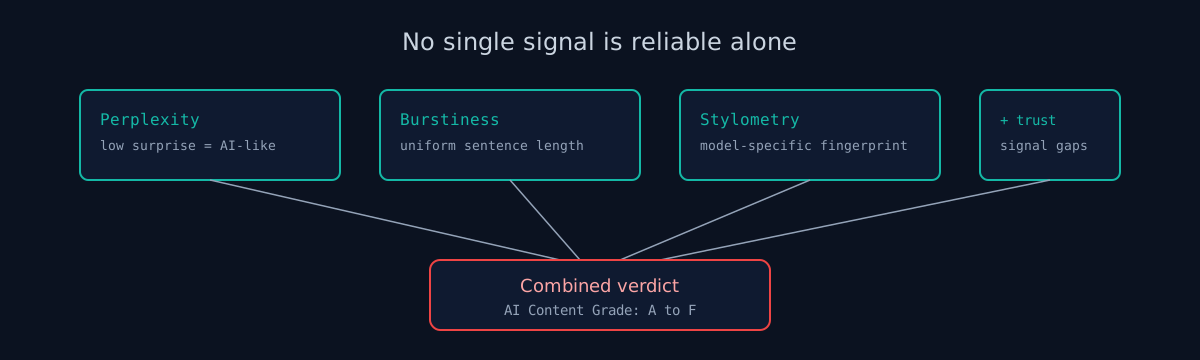
AI detectors measure how predictable text is (perplexity), how uniform sentence length is (burstiness), and what stylistic fingerprints a model leaves behind. In code, the same logic applies: AI-generated sites show low-entropy patterns in structure, content, and metadata. No single method is reliable alone - detection tools combine multiple signals into a verdict.
Perplexity and Burstiness
GPTZero made perplexity scoring famous in early 2023. The idea is straightforward: when a language model generates text, it picks the most probable next token at each step. The result is text with statistically low "surprise." A language model asked to measure how surprised it is by a passage gives AI-generated text low perplexity scores - because the text follows high-probability paths the model already knows.
Human writing hits unexpected words, unusual constructions, idiosyncratic phrasing. It surprises a language model more often. Perplexity detectors exploit that gap.
Burstiness measures sentence length variance. Humans mix short punchy sentences with long explanatory ones. That alternation is natural - it follows thought patterns. AI output is suspiciously uniform. Sentence lengths cluster around the same range, paragraph by paragraph. GPTZero combines both signals: low perplexity plus low burstiness is a strong indicator of generated text.
The catch: neither metric is reliable alone, and both degrade with editing. A human who writes in a formal, repetitive style scores poorly. An AI output run through a paraphraser scores better. Detectors combine perplexity and burstiness with other signals to reduce false positives.
Stylometry
Stylometry predates AI by decades. Researchers used it to resolve authorship disputes in Shakespeare's plays, attribute anonymous op-eds, and identify plagiarism in academic papers. The method measures writing style through statistics: function word frequencies (how often "the," "of," "and," and similar words appear), punctuation habits, average word length, and vocabulary richness - the ratio of unique words to total words.
Applied to AI detection, stylometry looks for the fingerprint of a specific model rather than a specific human. GPT-4 favors certain phrase constructions. Claude tends toward specific punctuation habits and sentence openers. Gemini has its own patterns. Each model leaves a statistical trace that a trained classifier can pick up on naive outputs.
The limits are real. Anyone who prompts carefully, uses a system prompt with strong stylistic instructions, or edits the output defeats most stylometric detectors. Stylometry works best on raw, unedited AI output - which is exactly what gets shipped on low-effort AI-generated websites.
AI Watermarking
In 2023, Google Research published a paper on cryptographic watermarking for language model outputs. The approach works at the token level: before generating text, the model partitions its vocabulary into "green" and "red" token lists using a secret key and a context hash. During sampling, the model is biased toward green tokens. The text reads normally to humans. But a detector that knows the key can check the proportion of green tokens in any passage - a high ratio is strong evidence of watermarked output.
OpenAI has also discussed watermarking. Neither company has deployed it publicly for general text output as of 2026, partly because the watermark breaks under translation, back-translation, and aggressive paraphrasing.
Image generators are further along. The C2PA (Coalition for Content Provenance and Authenticity) standard embeds cryptographically signed provenance metadata directly into image files. Adobe Firefly, DALL-E, and Stability AI support Content Credentials. When a generated image is uploaded to a website, that metadata is often still present in the file - a detectable watermark of sorts.
For code and web content, watermarking remains theoretical. Detection today relies on behavioral signals, not cryptographic proof.
Signs of AI Writing in Code
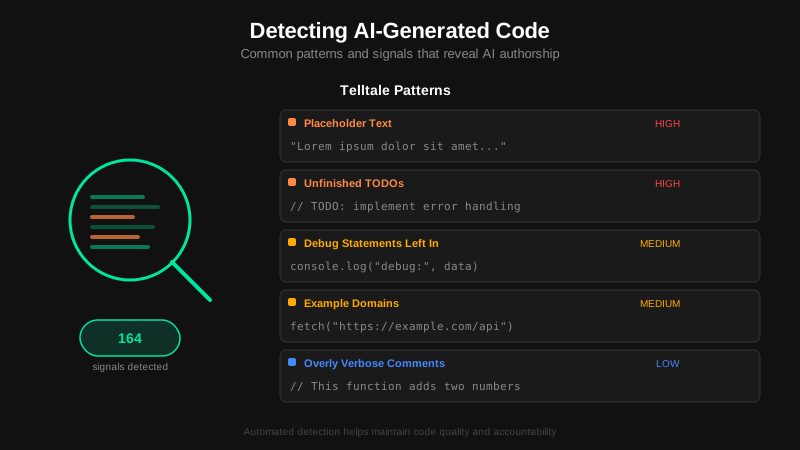
AI code tools produce predictable outputs because they pick high-probability tokens. That predictability shows up as boilerplate left in production, placeholder content, uniform text patterns, and missing trust signals. These are the patterns that automated scanning looks for.
Code-level signals:
- Framework boilerplate. Default Next.js welcome page, Create React App landing content, Vue CLI scaffolding text still present in production.
- Console.log statements. Debug logging left in production JavaScript bundles.
- TODO and FIXME comments. Visible in page source, indicating incomplete implementation.
- Inline styles everywhere. AI tools generate inline CSS instead of using design systems. A page with 50+ inline style attributes is a strong AI indicator.
- Localhost references.
http://localhost:3000or127.0.0.1URLs in production code. - Default error messages. "Something went wrong" or framework-default error pages without customization.
- Default meta tags. "Create Next App" or "Vite App" in the page title.
Content-level signals:
- Phrase patterns. AI-generated text reuses specific constructions - "seamlessly integrate," "empowering users," "at the forefront of." Scanners detect 14 common phrase patterns.
- Buzzword density. AI writing clusters hype vocabulary on a single page: transformation language, "next-level" superlatives, and innovation claims that no human marketing writer would stack so densely.
- Paragraph uniformity. Human writing varies naturally in paragraph length and sentence structure. AI-generated text produces uniform blocks.
- Placeholder content. Lorem Ipsum, example.com, John Doe, 123 Main Street, (555) 123-4567.
Trust signal gaps:
Google's quality guidelines emphasize E-E-A-T (Experience, Expertise, Authoritativeness, Trustworthiness). AI-generated sites typically skip the pages that establish trust: an About page with real people and credentials, a Contact page with a real contact method, a privacy policy, author attribution on content, and terms of service. No single missing page proves AI generation. The combination of missing trust signals with other fingerprints is what matters.
Automated Scanning
ismycodesafe.com runs 17 AI content detection checks as part of every scan. The checks cover phrase patterns, buzzword density, placeholder content, boilerplate detection, trust signal gaps, and image indicators. Each finding gets a severity rating. The combined score produces an AI Content grade from A (no signals detected) to F (heavy AI-generated content patterns found).
The goal is not to penalize AI usage. Sites built with AI tools that went through proper human review pass cleanly. The signal set targets sites that shipped without adequate review - the ones most likely to also have security issues, default configurations, and missing headers. If a site still has Lorem Ipsum in production, it probably also has the default admin credentials.
Check your website right now
200+ security checks in 60 seconds. Free, no signup required.
Scan My Website (Free)Claude AI helped me with phrasing and proofreading in this article.
ismycodesafe.com Security Team
We run automated security scans on thousands of websites daily, combining static analysis, SSL/TLS inspection, header auditing, and CVE lookups. Our team tracks OWASP, NIST, and evolving compliance requirements (GDPR, NIS2, PCI DSS) to keep these guides accurate and practical.