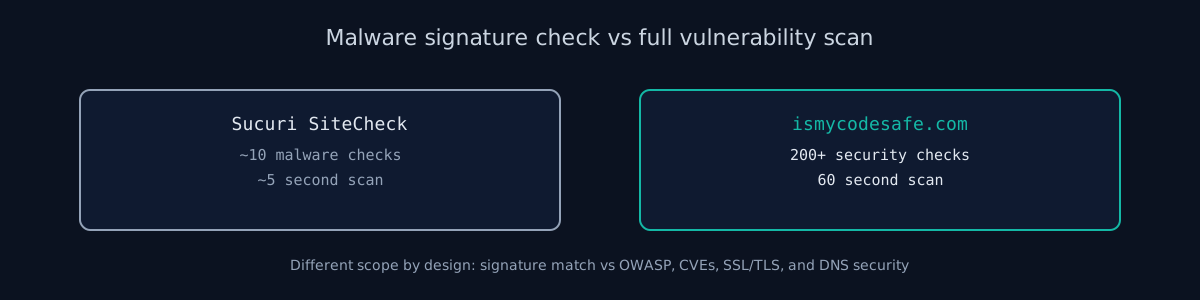
What Sucuri SiteCheck actually does
Sucuri SiteCheck is a free remote scanner focused on malware detection. It was built as a lead generator for Sucuri's paid website firewall and malware removal services. The scanner checks for:
- Known malware signatures (iframes, obfuscated JavaScript, injected code)
- Blacklist status on Sucuri's and third-party lists
- Spam injection indicators
- Defaced pages
- Basic software version detection (WordPress, Joomla, Drupal)
- A few HTTP security headers
It is fast and does one thing well: it tells you whether the site is currently infected.
Sucuri is direct about the boundary. Their scanner page states that "since the remote scanner only has access to what's visible on the browser level, it will not detect anything on the server-side", and that "remote scanners have limited access and results are not guaranteed". That is worth reading twice before treating a clean SiteCheck result as an all-clear. It is the same constraint every remote scanner works under, ours included, which is why breadth of checks matters more than the word "scan" on either homepage.
What ismycodesafe.com does differently
We built ismycodesafe.com as a full vulnerability scanner, not just a malware detector. The goal is to answer "is my code safe to ship?". Which requires checking dozens of attack vectors, not just known infections.
Our 200+ checks include everything Sucuri does (malware via VirusTotal, blacklist checks via Spamhaus) plus:
- OWASP Top 10 mapping: Every finding mapped to OWASP 2021 categories with A-F grading
- CVE detection: Tech stack fingerprinting with NVD and OSV API lookups
- Deep SSL/TLS: SSLyze-powered analysis for Heartbleed, CRIME, weak ciphers, protocol downgrades
- 53 sensitive file paths: .env, .git, backups, CI configs, cloud credentials
- Shodan InternetDB: Exposed ports and known CVEs for your server IP
- Certificate Transparency: Subdomain discovery via crt.sh logs
- JS library vulnerabilities: retire.js-based CVE detection for detected JavaScript libraries
When malware scanning matters more
If you're running a WordPress site and Google just flagged you as "This site may harm your computer," Sucuri SiteCheck will tell you exactly which files are infected. That's their core competency. They also offer paid cleanup services that fix the infection.
ismycodesafe.com won't give you file-level malware forensics. We use VirusTotal (which aggregates 70+ antivirus engines) to check if your URL is flagged as malicious, but we don't scan your server files directly.
When full scanning matters more
If you're a developer shipping new features and want to know "did I introduce any security issues?". Sucuri won't help. You need a scanner that checks:
- Missing security headers (CSP, HSTS, X-Frame-Options)
- Exposed .env files or .git directories
- CORS misconfigurations
- Outdated JavaScript libraries with CVEs
- Weak SSL/TLS cipher suites
- Information disclosure in error pages
That's where ismycodesafe.com fits. We're built for developers, not for incident response.
Pricing comparison
Sucuri: SiteCheck itself is free. Their paid platform plans are listed at $229/year (Basic), $339/year (Pro), and $549/year (Business), all including unlimited malware cleanups and the WAF. Firewall-only plans start at $9.99/month. A one-time cleanup without a plan is offered but not publicly priced; you have to contact sales. Prices checked against sucuri.net in August 2026 - verify before budgeting, they move.
ismycodesafe.com: Free basic scan covers all 200+ checks. Premium AI-generated report with code fix recommendations is $29 one-time. 30-minute code security consultation is $150.
How the two scans actually differ, step by step
Run the same URL through both tools and the difference in methodology becomes obvious within seconds:
Sucuri SiteCheck's process: fetches the homepage HTML, diffs it against known malware signatures, checks the domain against Sucuri's own blacklist database plus Google Safe Browsing and a handful of third-party lists, and reports whether the software (WordPress, Joomla, Drupal) is running an outdated version. The whole scan takes roughly 5 seconds because it is a single-page, signature-based lookup - there is no active probing of the server.
ismycodesafe.com's process: connects to the target over TCP/TLS directly (via SSLyze) to enumerate protocol versions and cipher suites, requests the page and inspects every response header against a checklist of 8+ security headers, probes 53 known sensitive file paths (.env, .git/config, backup archives, CI configs), queries Shodan InternetDB and crt.sh for exposed ports and subdomains tied to the server IP, cross-references detected JavaScript library versions against the NVD and OSV CVE databases, and checks the URL against VirusTotal, Spamhaus, and URLhaus. That breadth is why the scan takes 60 seconds instead of 5 - it is doing dozens of independent lookups instead of one signature match.
Neither approach is wrong. A malware-infected WordPress site does not need a 53-path sensitive-file scan; it needs Sucuri's signature match. A pre-launch Next.js app has no malware to detect yet; it needs the header, TLS, and CVE checks Sucuri skips entirely.
What a free scan actually buys you
Both tools have a free scan, and both free scans are honest about being a starting point rather than an audit. The difference is where each one stops.
Sucuri's free scan is complete for its purpose. It answers "is this site infected or blocklisted right now?" and it answers it in about five seconds. What it does not do is look for the conditions that lead to infection, and it cannot see the server side at all. Their paid plans are where cleanup, the WAF, and monitoring live.
Our free scan runs the full 200+ check set rather than a teaser subset: OWASP mapping, CVE lookups, TLS analysis, 53 sensitive paths, DNS records, threat-intelligence listings. What is paid is the write-up, not the checks - a $29 report that explains each finding with fix guidance. If you never buy the report, you still get every finding on screen.
Neither free scan replaces someone reading the results. A scanner tells you the .env file is reachable. It cannot tell you which credentials were in it.
Using both together
These tools complement each other. If you're serious about website security:
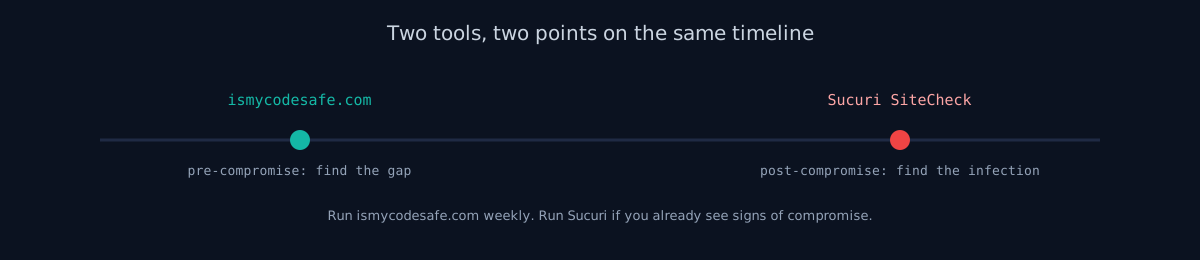
- Run ismycodesafe.com weekly to catch new vulnerabilities in your code and infrastructure
- Run Sucuri SiteCheck if you see suspicious behavior on your site (unexpected popups, Google warnings)
- Consider Sucuri's WAF if you're a high-value target for attackers (news site, e-commerce, political)
The honest summary
Sucuri is great at malware detection and cleanup. That's what they built. If you're post-compromise, use them.
ismycodesafe.com is great at vulnerability detection and prevention. If you're pre-compromise (which you should be), use us.
Both are free to try. Sucuri will sell you a firewall. We'll sell you an AI-generated report with code fixes if you want it.
For the full methodology behind our checks - reconnaissance, transport security, headers, and access control - see the Web App Security Testing Guide.
Sucuri SiteCheck vs ismycodesafe.com - FAQ
- Is Sucuri SiteCheck free?
- Yes. Sucuri SiteCheck is a free remote scanner that checks for known malware signatures, blacklist status, and a limited set of security headers. There is no account required. Sucuri's paid services start at $199.99/year and cover website firewall (WAF) and malware removal - the free scanner is a lead-generation tool for those paid plans.
- What does Sucuri SiteCheck not check?
- Sucuri SiteCheck does not check SSL/TLS configuration depth (protocols, ciphers, Heartbleed), CVEs in your tech stack, OWASP Top 10 vulnerabilities, exposed .env or .git paths, subdomain enumeration, DNS security records (SPF, DMARC, DKIM), or Shodan-exposed ports. It focuses narrowly on malware signatures and blacklist status.
- Is ismycodesafe.com better than Sucuri SiteCheck?
- It depends on what you need. Sucuri SiteCheck is better if your site is already infected and you need file-level malware forensics. ismycodesafe.com is better for pre-compromise vulnerability assessment: 200+ checks covering OWASP, CVEs, SSL/TLS, DNS security, and sensitive path exposure. Most developers should run ismycodesafe.com before Sucuri becomes relevant.
- Can I use both Sucuri SiteCheck and ismycodesafe.com?
- Yes, and they complement each other. Run ismycodesafe.com weekly as a pre-deploy vulnerability gate. Run Sucuri SiteCheck if you see signs of compromise (unexpected redirects, Google Safe Browsing warnings, user-reported malware alerts). They solve different problems at different points in the security timeline.
- How accurate is Sucuri SiteCheck?
- Sucuri SiteCheck is accurate for what it checks: known malware signatures, blacklist status, and outdated CMS version detection. Like any signature-based scanner, it can miss zero-day malware or heavily obfuscated payloads it has not seen before, and it cannot detect vulnerabilities that have not yet been exploited (misconfigured headers, exposed .env files, weak TLS ciphers). A clean SiteCheck result means no known infection, not a clean bill of security health.
- Does ismycodesafe.com scan for malware like Sucuri does?
- Partially. We check the submitted URL against VirusTotal (70+ antivirus engines), Spamhaus DBL, and URLhaus for known-malicious flags - the same class of blacklist data Sucuri uses. What we do not do is scan your server's files directly for injected code or obfuscated JavaScript, which is Sucuri's core competency. If you suspect an active infection, run Sucuri SiteCheck first.